Bootstrap your CI with Jenkins and GitHub

Continuous Integration is hotter than ever, and for good reason. *BLAH BLAH, CI IS GREAT!*. You know the drill.

Basically, you don’t need to change everything in your current development pipeline in one shot, you can take it in steps. A good first step would be to start using Jenkins.

What will you need to get started? Firstly, you will need some hardware to run Jenkins on. Virtual hardware is as good as any, so boot up quickly on your favorite cloud hosting provider. It doesn’t have to be a monster machine, a CPU core or two with 2 GB of RAM will get you quite far for smaller projects.

If you intend to use Jenkins for larger projects and/or intend to have several builds running simultaneously, you will obviously want to crank up the hardware accordingly.

The amount of disk space you will need is very much dependant on the project you are working on. But here’s a few key things to remember:

  • By default, Jenkins will save all builds of your project, so make sure you have enough room for plenty of builds.

  • Then add a couple of GB for your favorite OS as well as Jenkins itself.

  • Finally, add a few more for good measure. It’s never fun to have builds fail because of a full disk. Bear in mind that some plug-ins can use a fair share of disk space as well.

The Jenkins software itself is a web based java application. Installing it is pretty easy thanks to all the different packages provided by Jenkins for almost all major operating systems. And if you’re already running an application server, a web application archive is provided as well.

Several package repositories are available too, making it a breeze to keep your installation up to date. If you, like me, are on a Debian based Linux flavour, installation is as follows:

Add the repository key:

wget -q -O - http://pkg.jenkins-ci.org/debian/jenkins-ci.org.key | sudo apt-key add -

Add the repository to your source list:

/etc/apt/sources.list
deb http://pkg.jenkins-ci.org/debian binary/

Update your package list:

sudo apt-get update

And finally, install Jenkins.

sudo apt-get install jenkins

There are two different release tracks for Jenkins. The bleeding edge releases are called “Latest and Greatest” and the stable are called “Long term support”. Which you choose is up to you.

Another installation alternative could be to use a Turnkey image for Jenkins.

After installation is complete, you can access Jenkins in a web browser on port 8080 by default. No login is required and you should setup some security through the “Manage Jenkins” -> “Configure Global Security” menu.

If you, like me, like using Git, and in particular GitHub, you should install the GitHub plugin through the “Manage Plug-ins” menu. Click the “Available” tab and filter on “GitHub”. Install the GitHub plugin and make sure the server has “Git” installed as well.

If your repository is private, the Jenkins server will also need a SSH key to use when fetching your code from GitHub. Create one from command line or equivalent:

ssh-keygen -t rsa

Enter the private key as a new credential set in Jenkins under “Credentials” -> “Global credentials” -> “Add Credentials”. Switch “Kind” to “SSH username with private key” and paste your private key in the “Key” field.

jenkins-credentials

Make sure your newly created public key is added to your repository as a deploy key on GitHub.

Now you are ready to create a job in Jenkins!:

  • Click “New Job” and select “Build a free-style software project” as well as giving it a name.

  • On the next page, select Git as your project’s source code management. Select the SSH key you entered previously as credentials and the URL to your GitHub project. If you want to build a branch other than master you can specify it here as well.

  • Save your settings and go ahead and build your project through Jenkins with the “Build now” menu. If everything was setup correctly you will now see a progress bar under the Jenkins menu while your project is building. Hopefully, you get a blue dot next to your project name, meaning your build was successful.

jenkins-demo-settings

This is cool and all, but you’re not likely going to open up Jenkins each time you push new code. Instead, go over to GitHub again and do the following:

  • Open up the settings for your project.

  • Select “Service hooks” and then “Jenkins (GitHub)”.

  • Enter the URL of your Jenkins server followed by the path /github-webhook/.

Now for the fun part! Push some new code to your repo and watch Jenkins build your project without your intervention.

Congratulations, your first step in your continuous integration pipeline is now completed!

As a next step I would suggest setting up email notifications for when builds are failing and explore some other plug-ins like the Load Impact Jenkins plug-in for automated load testing.

How did the Obama Administration blow $400M making a website?

By doing software development and testing the way it’s always been done.

There is nothing new in the failure of the Obamacare site. Silicon Valley has been doing it that way for years. However new methodologies and tools are changing all that.

There has been a huge amount of press over the past several weeks about the epic failure of the Obamacare website. The magnitude of this failure is nearly as vast as the righteous  indignation laid at the feet of the administration about how this could have been avoided if only they had done this or that.  The sub text being that this was some sort of huge deviation from the norm. The fact is nothing could be farther form the truth. In fact, there should be a sense of déjà-vu-all-over-again around this.

The record of large public sector websites are one long case study in epic IT train wrecks.

In 2012 the London Olympic Ticket web site crashed repeatedly and just this year the California Franchise Tax Board’s new on-line tax payment system went down and stayed down – for all of April 15th.

So, this is nothing new.

As the Monday morning quarterbacking continues in the media one of my favorite items was a CNN segment declaring that had this project had been done in the lean mean tech mecca that is Silicon Valley, it all would have turned out differently because of the efficiency that we who work here are famous for. And as someone who has been making online software platforms in the Bay Area for the past decade, I found that an interesting argument, and one worth considering and examining.

Local civic pride in my community and industry generates a sort of knee jerk reaction. Of course we would do it better/faster/cheaper here. However if you take a step back and really look honestly at how online Software as a Service (SaaS) has been done here over most of the past 20 or so years that people have been making websites, you reach a different conclusion. Namely, it’s hard to fault Obama Administration. They built a website in a way that is completely in accordance with the established ways that people have built and tested online Software platforms for most of the past decade in The Valley.

The only problem is it doesn’t work.  Never has.

The problem then isn’t that they did anything out of the ordinary.  On the contrary.  They walked a well worn path right off a cliff very familiar to the people I work with. However, new methodologies and tools are changing that. So, the fault is that they didn’t see the new path and take that instead.

I’d like to point out from the start that I’ve got no special knowledge about the specifics of HealthCare.gov. I didn’t work on this project.  All of what I know is what I’ve read in the newspapers. So starting with that premise I took a dive into a recent New York Times article with the goal of comparing how companies in The Valley have faced similar challenges, and how that would be dealt with using the path not taken, of modern flexible — Agile in industry parlance — software development.

Fact Set:

  • $400 million
  • 55 contractors
  • 500 million lines of code 

$400 million — Lets consider what that much money might buy you in Silicon Valley. By December of 2007 Facebook had taken in just under $300 million in investment and had over 50 million registered users — around the upper end of the number of users that the HealthCare.gov site would be expected to handle.  That’s big. Comparisons between the complexity of a social media site and a site designed to compare and buy health insurance are imperfect at best. Facebook is a going concern and arguably a much more complex bit of technology.  But it gives you the sense that spending that much to create a very large scale networking site may not be that extravagant. Similarly Twitter had raised approximately $400 million by 2010 to handle a similar number of users. On the other hand eBay, a much bigger marketplace than HealthCare.gov will ever be, only ever asked investors for $7 million in funding before it went public in 1998.

55 contractors — If you assume that each contractor has 1,000 technical people on the project you are taking about a combined development organization about the size of Google (54,000 employees according to their 2013 Q3 Statement) for HeathCare.gov. To paraphrase the late Sen. Lloyd Benson ‘I know Google, Google is a friend of mine and let me tell you… you are no Google’

500 million lines of code – That is a number of astronomical proportions. It’s like trying to image how many matches laid end to end would reach the moon (that number is closer to 15 billion but 500 million matchsticks will take you around the earth once). Of all the numbers in here, that is the one that is truly mind boggling.  So much to do something relatively simple. As one source in the article points out, “A large bank’s computer system is typically about one-fifth that size.”  Apples latest version of the OSX operation system for computers has approximately 80 million lines of code.  Looking at it another way, that is a pretty good code to dollar ratio. The investors in Facebook probably didn’t get 500 million lines of code for their $400 million. Though, one suspects, they might have been pretty appalled if they had.

So if the numbers are hard to mesh with Silicon Valley, what about the process — the way in which they went about doing this, and the resulting outcome?  Was the experience of those developing this similar, with similar outcomes, to what might have taken place in Silicon Valley over the past decade or so? And, how does the new path compare with this traditional approach?

The platform was ”70 percent of the way toward operating properly.”   

Then – In old school Silicon Valley there was among a slew of companies the sense that you should release early, test the market, and let the customers find the bugs.

Now – It’s still the case that companies are encouraged to release early, and if your product is perfect it was thought that you waited too long to release.  The difference is that the last part — let the customers find the bugs — is simply not acceptable, excpet for the very youngest  beta test software,. The mantra with modern developers is, fail early and fail often.  Early means while the code is still in the hands of developers, as opposed to the customers.  And often means testing repeatedly — ideally using automated testing. This, as opposed to manual tests, that were done reluctantly, if at all.

“Officials modified hardware and software requirements for the exchange seven times… As late as the last week of September, officials were still changing features of the Web site.” 

Then —  Nothing new here. Once upon a time there was a thing called the Waterfall Development Method. Imagine a waterfall with different levels each pouring over into the next, each level of this cascade represented a different set of requirements each dependent on the level above it and the end of the process was a torrent of code and software the would rush out to the customer in all its complex feature-rich glory called The Release. The problem was that all these features and all this complexity took time — often many months for a major release, if not longer. And over time the requirements changed. Typically the VP of Sales or Business Development would stand up in a meeting and declared that without some new feature that was not on the Product Requirement Document, some million-dollar deal would be lost. The developers, not wanting to be seen as standing in the way of progress, or being ordered to get out of the way of progress, would dutifully add the feature or change a requirement, thereby making an already long development process even longer. Nothing new here.

Now — The flood of code that was Waterfall has been replaced by something called Agile, which as the name implies, allows developers to be flexible, and expect that the VP of Sales will rush in and say, “Stop the presses!  Change the headline!”  The Release is now broken down into discrete and manageable chunks of code in stages that happen on a regular weekly, if not daily, schedule. Software delivery is now designed to accommodate the frequent and inherently unpredictable demands of markets and customers. More importantly, a problem with software can be limited in scope to a relatively small bit of code with where it can be quickly found and fixed.

“It went live on Oct. 1 before the government and contractors had fully tested the complete system. Delays by the government in issuing specifications for the system reduced the time available for testing.”

Then — Testing was handled by the Quality Assurance (QA) team. These were often unfairly seen as the least talented of developers who were viewed much like the Internal Affairs cops in a police drama. On your team in name only, and out to get you.  The QA team’s job was to find mistakes in the code and point them out publicly, and make sure they got fixed. Not surprisingly, many developers saw little value in this. As I heard one typically humble developer say, “Why do you need to test my code? It’s correct.The result of this mindset was that as the number of features increase, and time to release remained unchanged, testing got cut.  Quality was seen as somebody else’s problem.  Developers got paid to write code and push features.

Now — Testing for quality is everybody’s job. Silos of development, operations and QA are being combined into integrated Dev/Ops organizations in which software is be continuously delivered and new features and fixes are continuously integrated into live websites. The key to this is process — known by the refreshingly straight name of  Continuous Delivery — is automated testing that frees highly skilled staff from the rote mechanics of doing testing, and allows them to focus on making a better product, all the while assuring the product is tested early often and continuously. A Continuous Delivery product named Jenkins is currently one of the most popular and fastest growing open source software packages.

“The response was huge. Insurance companies report much higher traffic on their Web sites and many more callers to their phone lines than predicted.”

Then — The term in The Valley was victim of your own success. This was shorthand for not anticipating rapid growth or positive response, and not testing the software to ensure it had the capacity and performance to handle the projected load and stress that a high volume of users places on software and the underlying systems. The reason for this was most often not ignorance or apathy, but that the software available at the time was expensive and complicated, and the hardware needed to do these performance tests was similarly expensive and hard to spare.  Servers dedicated solely for testing was a luxury that was hard to justify and often appropriated for other needs.

Now — Testing software is now often cloud-based, on leased hardware, which means that anybody with a modicum of technical skill and an modest amount of money can access  tools that would have been out of reach of all but the largest, most sophisticated software engineering and testing teams with extravagant budgets. Now, not only is there no excuse for not doing it, is in fact inexcusable. Software is no longer sold as licensed code that comes on a CD.  It is now a service that is available on demand — there when you need it. Elastic.  As much as you need, and only what you need.  And, low entry barrier.  You shouldn’t have to battle your way through a bunch of paperwork and salespeople to get what you need.  As one Chief Technical Officer at a well know Bay Area start-up told me,  “If I proposed to our CEO that I spend $50,000 on any software, he’d shoot me in the head.” Software in now bought as service.

It’s far from clear at this point in this saga as to the what, how and how much it will take to fix the HealthCare.gov site. What is clear is that while the failure should come as no surprise give the history of government, and software development in general that doesn’t mean that the status quo need prevail for every. It’s a fitting corollary to the ineffective process’ and systems in the medical industry that the healthcare.org itself is trying to fix. If an entrenched industry like software development and Silicon Valley can change the way it does business and produce its services faster, better and at a lower cost; then maybe there is hope for the US health care industry doing the same.

By: Charles Stewart (@Stewart_Chas)

HealthCare.gov tech taskforce is invited to use our load testing services free of charge

We’re offering to provide the technology taskforce responsible for fixing the troubled HealthCare.gov website free use of our performance testing services until the Obamacare website is functioning at full capacity.

Healthcare .gov

In testimony before the House Energy and Commerce Committee on Thursday, officials of companies hired to create the HealthCare.gov website cited a lack of testing on the full system and last-minute changes by the federal agency overseeing the online enrollment system as the primary cause of problems plaguing the government exchange for President Barack Obama’s signature health care reforms.

Moreover, according to a confidential report obtained by CNN, the testing timeframes for the site were “not adequate to complete full functional, system, and integration testing activities” and described the impact of the problems as “significant.” The report stated there was “not enough time in schedule to conduct adequate performance testing” and was given the highest priority.

We know that there’s really nothing new in the failure of the Obamacare site. Websites have been developed that way for years – often with the same results. But there are now new methodologies and tools changing all that. That’s why  we’ve reached out to our California representatives and all of the companies involved to let them know we’re ready to provide our stress testing services to them free of charge.

It isn’t like it used to be – this shouldn’t be hard, time consuming or expensive. You just need to recognize that load testing is something that needs to be done early and continuously throughout  the development process. It’s not optional anymore. Unfortunately, it seems they found that out the hard way. But we sincerely want to help make it work.

HealthCare.gov represents hope for many Americans, and the elimination of their worst fears in medical care. Instead of whining about how incompetently HealthCare.gov has been built, we want to be part of making it work as it should and can.

Performance Testing Versus Performance Tuning

Performance testing is often mistaken for performance tuning. The two are related, but they are certainly not the same thing. To see what these differences are, let’s look at a quick analogy.

Most governments mandate that you bring your vehicles to the workshop for an inspection once a year. This is to ensure that your car meets the minimum safety standards that have been set to ensure it is safe for road use. A website performance test can be likened to a yearly inspection – It ensures that your website isn’t performing terribly and should perform reasonably well under most circumstances.

When the inspection shows that the vehicle isn’t performing up to par, we start running through a small series of checks to see how to get the problem solved in order to pass the inspection. This is similar to performance tuning, where we shift our focus to discovering what is necessary to making the application perform acceptably.

Looking in depth at the performance test results helps you to narrow down the problematic spots so you can identify your bottlenecks quicker. This in turn helps you to make optimization adjustments cost and time efficient.

Then we have the car enthusiasts. This group constantly works toward tuning their vehicle for great performance. Their vehicles have met the minimum performance criteria, but their goal now is to probably make their car more energy-efficient, or perhaps to run faster. Performance tuning goals are simply that – You might be aiming to reduce the amount of resources consumed to decrease the volume of hardware needed, and/or to get your website to load resources quicker.

Next, we will talk about the importance of establishing a baseline when doing performance tuning.

Tuning your website for consistent performance

Now that we know the difference between performance testing and performance tuning, let’s talk about why you will need a controlled environment and an established baseline prior to tuning web applications.

The importance of a baseline: Tuning your web application is an iterative process. There might be several factors contributing to poor website performance, and it is recommended to make optimization adjustments in small steps in a controlled test environment. Baselines help to determine whether an adjustment to your build or version improves or declines performance. If the conditions of your environment are constantly changing or too many large changes are made at once, it will be difficult to see where the impact of your optimization efforts come from.

To establish a baseline, try tracking specific criteria such as page load times, bandwidth, requests per second, memory and CPU usage. Load Impact’s server metrics helps to combine all these areas in a single graph from the time you run your first performance test. Take note of how these changes improve or degrade when you make optimization improvements (i.e. if you have made hardware upgrades).

Remember that baselines can evolve over time, and might need to be redefined if changes to the system have been made since the time the baseline was initially recorded.If your web application is constantly undergoing changes and development work, you might want to consider doing small but constant tests prior to, for instance, a new fix being integrated or a new version launch.

As your product development lifecycle changes, so will your baseline. Hence, doing consistent testing prior to a release helps save plenty of time and money by catching performance degradation issues early.

There is an increasing number of companies adopting a practice known as Continuous Integration. This practice helps to identify integration difficulties and errors through a series of automated checks, to ensure that code deployment is as smooth and rapid as possible.

If this is something that your company already practices, then integrating performance tuning into your product delivery pipeline might be as simple as using Load Impact’s Continuous Delivery Jenkins plugin. A plugin like this allows you to quickly integrate Jenkins with our API to allow for automated testing with a few simple clicks.

By Chris Chong (@chrishweehwee)

Write Scalable Code – use Jenkins to Automate your Load Testing

Starting today, we’re  accepting applications for early access to our new Load Impact Continuous Delivery service, which for the first time allows developers of websites, apps and APIs to make stress testing an integrated part of their continuous delivery process.

Our Continuous Delivery service comprises our API, SDKs and a library of plug-ins and integrations for popular continuous delivery systems – starting with Jenkins.

Easy to USe and Flexible Graph png

In order to better serve our customers and allow them to integrate their Continuous Delivery methodology with the Load Impact platform, we’re building programming libraries that make the API super easy to use. We’re starting with Jenkins and will soon rollout plug-ins for TeamCity, New Relic and CloudBees.

Simply put, the Jenkins plug-in will integrate load testing into developers’ automated Jenkins test suite to determine whether new builds meet specified traffic performance criteria.

(Download the plug-in)

The new Jenkins plug-in features multi-source load testing from up to 12 geographically distributed locations worldwide, advanced scripting, a GUI based session recorder to easily create tests simulating multiple typical user scenarios, and our new Server Metrics Agent (SMA) for correlating the Server Side impact of users on CPU, memory, disk space and network usage.

Read more about how to automate your load testing here and here.

Apply now to join our private beta group and receive FREE unlimited load testing for the duration of the beta period!

The Demise of Healthcare.gov and the Importance of Testing

Most people have probably already heard about the less than successful launch of http://www.healthcare.gov, often colloquially referred to as the ‘Obamacare website’. Bloggers and news agencies quickly jumped on the bandwagon to point out every piece of available evidence that this project is deeply flawed in every single way. Fingers have been pointing and names have been called. And let’s not start talking about what ObamaCare’s political opponents have said.

Certainly, there are plenty of differing opinions out there about what went wrong: Some will say that this is a reinforcing evidence that large software projects with too many people involved is a management nightmare that almost without exception, ends in failure until it hits version 3.0. While others will tell you that this is simply an expected outcome whenever the government embarks on just about anything. A third group will point to specific technical flaws that have emerged and it’s a clear indication that both management and the software engineers involved are simply bad people making kindergarten level mistakes.

So, what has this got to do with load testing? Quite a lot actually. As the makers of a very popular cloud-based load testing tool, we’ve always been advocates of tools and methodologies that leads to good and verifiable software quality.

Admittedly, we specialized in performance testing, but in this case it goes beyond that. Our opinion on what went wrong and what should have been done takes a non-political stand, in fact it’s pretty much neutral on development methodology and we definitely won’t call names. Just like in politics, our opinion boils down simply – it’s all about priorities.

Take a minute to think about the phrases ‘software quality’ and ‘verifiable software quality’. That additional word in the latter phrase means a lot and it changes everything. I can safely bet that this is something 100% of all software project managers covet, I mean, who wouldn’t? Yet it’s safe to say that less than 50% of all software PM’s can confidently claim that their projects have achieved it.

And why is that? Well, we’ve discussed it before here, when we briefly commented on our State of Web Readiness study. To begin, software quality doesn’t automatically materialize out of thin air in a project just because you have hired the crème de la crème of developers (how would you even define that?), let alone even the most experienced developers.

You will have good software quality if you make it a priority; not with a mere ‘Should-have’ but a ‘top of the line, grade A must-have’ type of priority. Then, when you’ve decided that quality is top priority in your project (again, who wouldn’t?), adding the concept of verifiable software quality is another leap.

Going from the intention of developing good quality software to measuring it is a big but essential step. A lot of development organizations around the world have taken this step and I would be surprised if any of them regretted choosing it. Surely, it involves some form of upfront investment to do it correctly but once you’ve taken the initial steps, your project will benefit from the fruits of your labour.

I’m sure that what I’m saying here is not new to anyone involved in the healthcare.gov project. In a software project north of 500 million USD there’s bound to be many software quality assurance tools in place already. If I should guess, I’d say that the problem with the healthcare.gov project was a problem of test coverage. Evidently, some areas weren’t tested at all, while a large portion of the project hadn’t been tested in all aspects as it should.

What about performance testing? Well, it should be obvious that a system that needs to handle tens of thousands of concurrent users needs to be tested for performance in general and specifically to be tested under load; not just at the end but throughout all development cycles.

In the news we’ve read about an internal 100-user test that was done just one week before launch that managed to bring the site down. It is apparent that load testing the entire site hadn’t been carried out correctly, or worse, not at all.

To round up, I will offer two pieces of unsolicited advice to the entire team behind healthcare.gov:

Number one, don’t panic! Panic is probably what brought you into here in the first place.

Secondly, commit to verifiable software quality and use tools. Tools that measure how you’re doing, tools to verify you’re on the right track and to help you find unacceptable quality. And when you realize you need a really good load testing tool, give us a call.

By: Erik Torsner (@eriktorsner)

Server Metrics Tutorial

Here at Load Impact, we’re constantly developing new features to help make our load testing tool even more powerful and easy to use. Our latest feature, Server Metrics, now makes it possible for you to measure performance metrics from your own servers and integrate these metrics with the graphs generated from your Load Impact test. This makes it much easier for you to correlate data from your servers with test result data, while helping you identify the reasons behind possible performance problems in your site. We do this by installing agents on your servers in order to grab server metrics data, which we can later insert into the results graph.

Having been a pure online SaaS testing tool, we don’t like the hassle that downloads and setups bring, so we’ve tried to make it really simple to set this up and use. (After all, we are trying to make testing more efficient, not more frustrating!)

Here’s 5 steps on how you can get Server Metrics up to a flying start:

Step 1 (Optional): Check out where Server Metrics appears in your Test Configuration

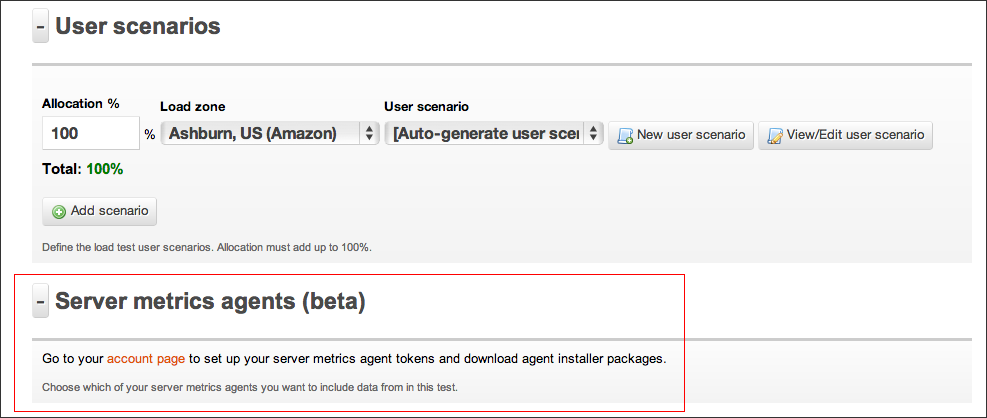
Go ahead and Log In to your account, then select the Test Configuration tab and create a new configuration. Alternatively, if you have current test configurations already set up, select one. Below the “User Scenarios” subsection, you should now find a section named “ Server Metrics”.  Click on “Go to Your account page”.
Alternatively, skip this step altogether and head straight to “Access Tokens” under the “Account” tab.

Step 2: Generating a Token

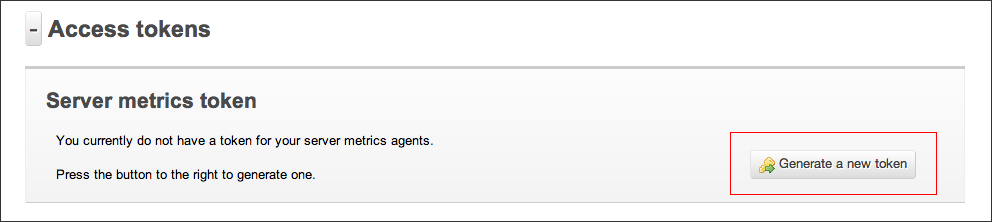
In order to identify our agents when they are talking to Load Impact, we need an identification key. We refer to this as a token. To generate a token, follow the instructions as stated.
(Yes, you only have to click on the “Generate a new token” button. Once :P)

Step 3: Download and install Server Metrics agent

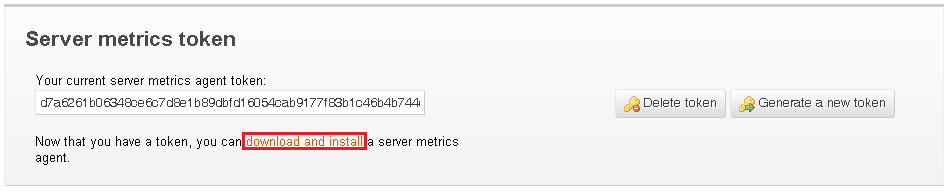
Now comes the hardest part. You’ll need to download and install our Server Metrics agent for your server platform. Installation should be as basic as following the instructions in our Wizard, on in the README file.

Step 4: Run your test!

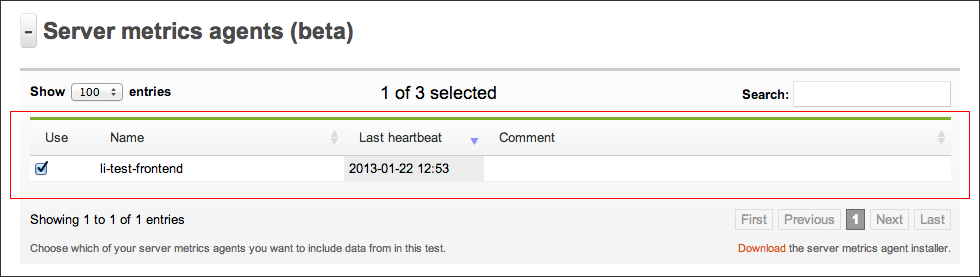
Once the server metrics agent is configured, you’ll immediately be able to select it in your Test Configuration (see Step 1). We recommend giving a name that describes the name of the server you’re installing it on for easier identification later on. From here, just configure and run your test as per normal.

Step 5: Viewing Server Metrics in your test results

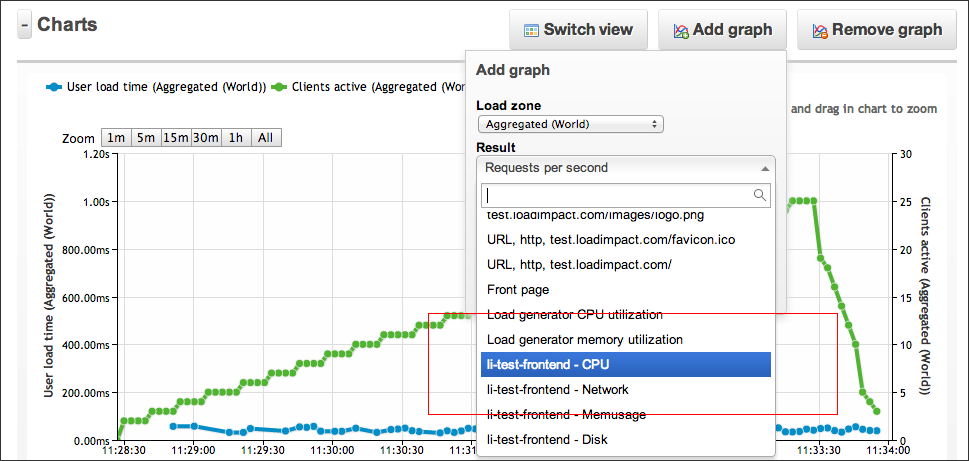
Once your test has started, you should be able to see your Server Metrics results in real time, just as with all of our other result graphs. Simply select the the kind(s) of server metrics you wish to view in the “Add Graph” drop down menu. This will plot the results for the specific server metric that you wish to view.

And that’s it! You’re all set towards easier bottleneck identification 🙂
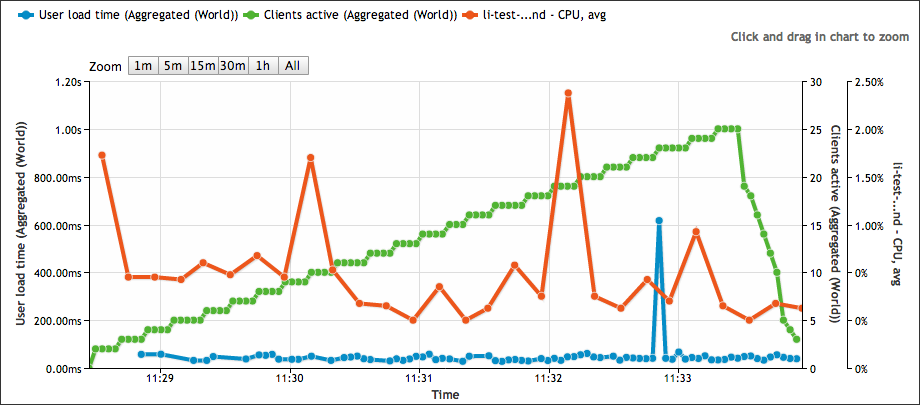
For an example of how these graphs are can help make your load testing life easier, take a look at the test results below. These results show your server’s CPU usage as load is being increased on your website.

Don’t think this is simple enough? Email support [at] loadimpact [dot] com to let us know how we can do one better!

Cloud Based Server-Side Load Testing

Just recently we announced the release of our Server Metrics agent. A feature that makes it possible to gather internal data from your server.

To get started with Server Metrics, please check out this tutorial that will guide you through the installation and setup process.

When Load Impact runs a test, the test server will collect a wide array of externally measured data. By measuring the load target from our end, we can quite easily pick up and store data about clients active, response time, transactions per second – just to name a few. We present this data to you in our web UI online, exported in CSV file or via our API for further analysis.

But there are a lot of other measurements that most of our users need to have to be able to do a better analysis of the performance and that is exactly what Load Impact Server Metrics tries to solve.

Fig 1. Memory and CPU usage of the target system

By installing the Server Metrics Agent on one or more target systems, our load testing server can pick up some internal measurements during the test and add those to the same data set. Load Impact  supports collecting data from several different target machines during a test, so it’s possible to get internal measurements from a fairly complex setup as well. The advantage of this is quite obvious.

Even if it would be possible to log this data separately on the target machines, you would end up with the task of trying to synchronize the time stamps of the internally generated data series with the data from Load Impact. Even if that’s of course possible to do, it’s going to be a bit of a hassle that you can easily avoid.

Technically, the Server Metric Agent software is a Python based script that will run as a service/daemon  on your target systems. It will require Python 2.6 and a fairly common library called psutil. Both Python 2.6 and psutil are open source and will run on pretty much every operating system we know of.  We offer installers for 32 and 64 bit Debian based Linux distributions, including Ubuntu, as well as for 64-bit Windows Server 2008 R2 and 2012.  For other systems, we offer the Python source code for download. Also note that in order to connect a Server Metric Agent installation to your, and only your, Load Impact account, you are required to generate a Server Metric token on your account settings page.

Automating Load Testing to Improve Web Application Performance

This blog post was originally written for the Rackspace DevOps blog. Check out this post and more great dev advice on their blog.

…….

Web application performance is a moving target. During design and implementation, a lot of big and small decisions are made that affect application performance – for good and bad. You’ve heard it before. But since performance can be ruined many times throughout a project, good application performance simply can not be added as an extra feature at the end of a project.

The modern solution to mitigate quality problems throughout the application development life cycle is called Continuous Integration, or just CI. The benefits of using CI are many, but for me, the most important factor for embracing CI is the ability to run automated tests frequently and to trace application performance, since such tests need to be added to the stack of automated tests already being generated. If you have load tests carried out throughout your project development, you can proactively trace how performance is affected.

The key is being able to automate load testing. But how do we do that? Naturally, it depends on your environment. Assuming that you’re building a web application and that your build environment is already in the cloud, it would be ideal to start using a cloud based load testing service such as Load Impact to automatically generate load and measure performance. In fact, libcurl will get you almost all the way.

Load Impact’s Continuous Delivery API was created to enable developers to run load tests programmatically. It’s an http based REST API that uses JSON for passing parameters. In its most basic form, you can run the following from a command line:

$ curl -X POST https://api.loadimpact.com/v2/test-configs/X/start -u token: {"id":Y}
$ curl -X GET https://api.loadimpact.com/v2/tests/Y/results -u token: > out.json

In this example X = the LoadImpact test config id, Y = the test result id and token = your LoadImpact API token. Please note that token is sent as an http username but with a blank password.

Since JSON is not that easy to work with from the command line, using PHP or Perl to wrap the calls in a script makes sense. A more complete sample doesn’t really fit into this blog post, but at a pseudo level you want to:

<?php

$token = '123456789';
$urlbase = 'https://api.loadimpact.com/v2/';
$config_id = 999;

// Start test and get id from JSON return
$test = http_post($urlbase . "/test-configs/$config_id/start"));

$done = FALSE;
while(!$done) {
  sleep(30);
  $status = http_get($urlbase . "/tests/{$test->id}");
  $if($status->status > 2) $done = TRUE;
}

$result = http_get($urlbase . "/tests{$test-id}/results");
$last = count($results->__li_user_load_time); 
echo $results->__li_user_load_time[$last]->value; ?>

First, some variables are set, the existing test configuration id and my API token being the most interesting.

Second, I ask Load Impact to launch the test configuration and store the test id. Wait for the test to finish by asking for its status code every 30 seconds.

Lastly, when I know the test if finished, I ask for the test result that I can then query for values. In this example, I simply echo the last measurement of the actual load time. If needed, the Load Impact API also allows me to manipulate the target URL before I launched the test, change the number of simulated users or make other relevant changes.

Running repeated load test as part of your CI solution will reveal a lot about how an application’s performance is affected by all those small decisions.

Note that you probably don’t want to run a full set of exhaustive performance tests at every build. I recommend that a few well-selected tests are executed. The key is to get a series of measurements that can be tracked over time.

On load testing and performance April-13

What are others are saying about load testing and web performance as of now? Well, apparently more people have things to say about how to make things scale rather than how to measure it, but anyway, this is what cought our attention recently:

  • Boundary.com has a two part interview with Todd Hoff, founder of High Scalability and advisor to several start ups. Read the first part here: Facebook Secrets of web performance
  • Another insight in how the big ones are doing it is this 30 minute video from this years Pycon US. Rick Branson of Instagram talks about how they handle their load as well as the Justin Bieber effect.
  • The marketing part of the world have really started to understand how page load times affect sales as well as Google rankings. In this article Online marketing experts portent.com explains all the loops and hoops they went trough to get to sub second page load time. Interesting read indeed.
  • One of my favorite sources for LAMP related performance insights is the MySQL performance blog. In a post from last week, they explain a bit about how to use their tools to analyze high load problems.
What big load testing or web performance news did we miss? Have your say in the comments below.

About Load Impact

Load Impact is the leading cloud-based load testing software trusted by over 123,000 website, mobile app and API developers worldwide.

Companies like JWT, NASDAQ, The European Space Agency and ServiceNow have used Load Impact to detect, predict, and analyze performance problems.
 
Load Impact requires no download or installation, is completely free to try, and users can start a test with just one click.
 
Test your website, app or API at loadimpact.com

Enter your email address to follow this blog and receive notifications of new posts by email.