When to Leverage Commercial Load Testing Services, and When to Go it Alone

How and where you execute load and performance testing is a decision that depends on a number of factors in your organization and even within the application development team.

It is not a clear cut decision that can be made based on the type of application or the number of users, but must be made in light of organizational preferences, cadence of development, timeline and of course the nature of the application itself and technical expertise currently on staff.

In this post we will provide some context around some of the key decision points that companies of all size should consider when putting together load NS performance testing plans.

This discussion is really an amalgamation of On-Premise versus SaaS/Open-Source versus Commercial Services.

In the load testing space there are commercial offerings that offer both SaaS and on-premise solutions as well as many SaaS only solutions for generating user load.

From an open source perspective, JMeter is the obvious choice (there are other less popular options such as FunkLoad, Gatling, Grinder, SOAPUI, etc). Having said that, let’s look at the advantages and challenges of the open source solution,  JMeter, and contrast that with a cloud-based commercial offering.

Key JMeter Advantages:

  1. 100% Java application so it can be run on any platform (windows, osx, linux) that can run Java.
  2. Ability to test a variety of types of servers – not just front end HTTP servers.  LDAP, JMS, JDBC, SOAP, FTP are some of the more popular services that JMeter can load test out of the box.
  3. Extensible, plug-in architecture. The open source community is very active in development around JMeter plugins and many additional capabilities exist to extend reporting, graphing, server resource monitoring and other feature sets.  Users can write their own plugins if desired as well.  Depending on how much time and effort is spent there is little that JMeter can’t be made to do.
  4. Other than the time to learn the platform there is no software cost of course since it is open source.  This may be of particular value to development teams with limited budget or who have management teams who prefer to spend on in-house expertise versus commercial tools.
  5. It can be easy to point the testing platform at a development server and not have to engage the network or server team to provide external access for test traffic.  It’s worth noting that while this is easier it is also less realistic in terms of real world results.

Key JMeter Disadvantages:

  1. Being that it is open source you do not have an industry vendor to rely upon for support, development or expertise.  This doesn’t mean that JMeter isn’t developed well or that the community isn’t robust – quite the opposite. Depending on the scope of the project and visibility of the application it can be very helpful to have industry expertise available and obligated to assist.  Putting myself in a project manager’s shoes, would I be comfortable telling upper management, “we thoroughly tested the application with an open source tool with assistance from forums and mailing lists?” if there were to be a major scale issue discovered in production?
  2. It’s very easy to end up with test results that aren’t valid.  The results may be highly reliable – but reliably measuring bottlenecks that have nothing to do with the application infrastructure isn’t terribly useful.  Since JMeter can be run right from a desktop workstation, you can quickly run into network and CPU bottlenecks from the testing platform itself – ultimately giving you unrealistic results.
  3. Large scale tests – not in the wheelhouse of JMeter.  Right in the documentation (section 16.2 of best practices) is a warning about limiting numbers of threads.  If a truly large scale test is required you can build a farm of test servers orchestrated by a central controller, but this is getting pretty complicated, requires dedicated hardware and network resources, and still isn’t a realistic real-world scenario anyway.
  4. The biggest disadvantage is inherent in all on-premise tools in this category in that it is not cloud based.  Unless you are developing an in-house application and all users are on the LAN, it does not makes a ton of sense to rely (entirely) on test results from inside your network.  I’m not suggesting they aren’t useful but if users are geographically distributed then testing in that mode should be considered.
  5. Your time: doing everything yourself is a trap many smart folks fall into, and often times at the expense of project deadlines, focus. Your time is valuable and in most cases it could be better spent somewhere else.

This discussion really boils down to if you like to do things yourself or if the project scope and criticality dictate using commercial tools and expertise.

For the purposes of general testing, getting familiar with how load testing works and rough order of magnitude sizing, you can certainly use open source tools on your own – with the caveats mentioned.  If the application is likely to scale significantly or have users geographically distributed, then I do think using a cloud based service is a much more realistic way to test.

In addition to the decision of open source versus commercial tools is if professional consulting services should be engaged.  Testing should be an integral part of the development process and many teams do not have expertise (or time) to develop a comprehensive test plan, script and configure the test, analyse the data and finally sort out remediation strategies on their own.

This is where engaging experts who are 100% focused on testing can provide real tangible value and ensure that your application scales and performs exactly as planned.

A strategy I have personally seen work quite well with a variety of complex technologies is to engage professional services and training at the onset of a project to develop internal capabilities and expertise, allowing the organization to extract maximum value from the commercial product of choice.

I always recommended to my customers to budget for training and service up front with any product purchase instead of trying to shoe-horn it in later, ensuring new capabilities promised by the commercial product are realized and management is satisfied with the product value and vendor relationship.

——

Peter CannellThis post was written by Peter Cannell. Peter has been a sales and engineering professional in the IT industry for over 15 years. His experience spans multiple disciplines including Networking, Security, Virtualization and Applications. He enjoys writing about technology and offering a practical perspective to new technologies and how they can be deployed. Follow Peter on his blog or connect with him on Linkedin.

Don’t miss Peter’s next post, subscribe to the Load Impact blog by clicking the “follow” button below. 

5 Lessons Learned After Self-Hosting Goes Haywire

When things start to go wrong it can sometimes be impossible to contain the unravelling – as if the problematic situation quickly gains momentum and begins to ‘snowball’ into an even worse situation.

This happened to me recently. And since much of what went wrong could have been prevented with good process controls, I believe I have some valuable lessons to share with you.

At the very least this post will be entertaining, as I assume many of you reading this will think to yourself: “yep, been there done that”.

I’ll start by mentioning how I met the folks at Load Impact and started working with their product and writing for them.

I was doing some shopping for a hosting provider for my personal and business website, and ran across someone else’s blog post that tested the performance of all the major players in the ‘affordable web hosting’ segment.  We are talking the $8/month type deals here – the bare bones.

This author used Load Impact to quantify the performance of all these providers and provided great insight into how they faired from a performance and scalability perspective.

My first thought was: awesome! – I’ll use that same tool and test a few out myself, and then compare it to the performance of a self-hosted site.  I already had a bunch of VMs running on an ESXI server so adding a turnkey wordpress site would be super easy.

It turns out that my self hosted site was much faster and scaled all I needed (thanks to Load Impact), so in the end I decided to just self host.

I’m not making any money from the sites – no ecommerce or ads – so it doesn’t really matter from a business perspective.It’s also easier to manage backups and control security when you manage the whole environment.

But it’s also much more likely that the whole thing will get screwed up in a major time-consuming way.

I imagine there are many SMBs out there that self host as well, for a variety of reasons.  It could be that you like having control of your company assets, it was faster and cheaper, or you just like doing everything yourself.

It’s often very difficult for smart people to avoid doing things they can do but probably shouldn’t do as it might not be the best use of their time.

In this blog post I’ll demonstrate how how quickly this situation can go wrong and then go from bad to worse:

Problem #1: my ISP screwed me!

If you are in business long enough, your ISP will screw you too.  I made a change to my service plan (added phone line) which I did the week before we went out of town.

For some reason nothing happened so I decided called my provider while 300 miles away from my house. Of course, this is exactly when things started to unravel.

Instead of provisioning my modem correctly, they removed my internet service and added phone.  No internet.  To make matter worse,  I’m not at home so I can’t troubleshoot.

Lesson #1 – don’t make changes with your ISP unless you can be onsite quickly to troubleshoot.

It was nearly impossible for me to troubleshoot this issue as I couldn’t VPN into my network, there wasn’t a connection at all.

I even had a neighbor come in and manually reboot both my firewall and modem.  That didn’t work, so my only recourse was a dreaded call to customer support.

The first time I called it was a total waste of time, the Customer Support agent had no idea what was going on so that call ended.

Call number two the next day was slightly more productive in that it ended 45 minutes later and a level 2 support ticket was opened.

Finally, upon getting a level 2 engineer on the line (I was home at this point), they immediately recognized that my modem was mis-provisioned and was setup for phone only!  It only took minutes to properly provision the modem and get it back online.

Lesson #2 – if you are technically savvy, then immediately demand a level 2 support engineer. Time spent with first line support is usually a totally frustrating time suck.

giphy

Problem #2: Some things start working again and others mysteriously don’t 

After the final problem-resolving phone call was complete I was tired, hot (AC was off while out of town) and irritated. So when the internet connection finally came back up, I wasn’t exactly in a “I’m making great decisions” mindset.

So I go to check my site and one works fine, but this one it not up at all.  I reboot the VM but still no response from the server.

I’m not sure what is going on.

Lesson #3 – Don’t start making significant changes to things when tired, hot and irritated.  It won’t go well.

This is exactly the point at which I should have made a copy of the VM in it’s current state to make sure I don’t make things worse.  But instead I immediately go to my backup server (Veeam) and try to restore the VM in question.

Well guess what?  That didn’t work either, some sort of problem with the storage repository for Veeam.  Unfortunately, the problem is that some of the backup data is corrupt.

I ended up with a partially restored but completely unusable webserver VM.

giphy-2

Lesson #4 – Test your backups regularly and make sure you have more than one copy of mission critical backups.  

At some point in this whole fiasco, I remembered what this package I had on my desk was.  It was a replacement hard drive for my ZFS array because one of my 4 drives in the RAIDZ1 array was “failing”.

I figured that now would be the perfect time to swap that drive out and allow the array to heal itself.

Under normal circumstances this is a trivial operation, no big deal.  Not this time!

This time, instead of replacing the failing hard drive, I accidentally replace a perfectly good drive!

So now I have a really tenuous situation with a degraded array that includes a failing hard drive and no redundancy whatsoever.

Fortunately there wasn’t any real data loss and eventually I was able to restore the VM from a good backup source.

Finally back online!

Lesson #5 – Be extra diligent when working on your storage systems and refer to Lesson #3.

The overall message here is most, if not all, of these issues could have been easily avoided. But that is the case 99% of the time in IT – people make mistakes, there is a lack of good well documented processes to handle outages, and of course hardware will fail.

It’s also worth noting that in large enterprises mechanisms for change control are usually in place – preventing staff from really messing things up or making changes during business hours.

Unfortunately, many of smaller businesses don’t have those constraints.

So what does this have to do with Load Impact?  Nothing directly…but I think it’s important for people to be aware of the impact that load and performance testing can have on the infrastructure that runs your business and plan accordingly when executing test plans.

Just like you wouldn’t do something stupid like changing network configs, ISP settings or Storage without thoroughly thinking it through, you should also not unleash a world-wide load test with 10,000 concurrent users without thinking about when you should execute the test (hint – schedule it) and what the impact will be on the production systems.

Hopefully there is a test/dev or pre-production environment where testing can take place continuously, but don’t forget many times there are shared resources like firewalls and routers that may still be affected even if the web/app tiers may not be.

And always remember Murphy’s lawAnything that can go wrong will go wrong. 

———-

Peter CannellThis post was written by Peter Cannell. Peter has been a sales and engineering professional in the IT industry for over 15 years. His experience spans multiple disciplines including Networking, Security, Virtualization and Applications. He enjoys writing about technology and offering a practical perspective to new technologies and how they can be deployed. Follow Peter on his blog or connect with him on Linkedin.

Don’t miss Peter’s next post, subscribe to the Load Impact blog by clicking the “follow” button below. 

Is Your Application as Mobile and Global as You Claim it is? – Prove it!

Your application has been localized, your website is responsive, you’ve even built a mobile app – how about your performance?! 

It takes more than a mobile app, responsive design and localization to stay ahead of the game, make sure your performance can also meet the demands of an increasingly mobile and global user-base.

Regardless of whether your applications are in a highly virtual, cloud based environment or a self-hosted single datacenter, realistic performance testing must take into account all the complexities that exist between applications and end users. In today’s highly mobile world, users can literally be anywhere in the world coming across connections that vary widely in quality and speed.

A successful application deployment must take into account factors that influence this Quality of Experience (QX) and integrate continuous testing that best simulates a wide variety of situations.

Not long ago, load testing was a simple and typically one-time test done to size hardware before a roll-out. Testing was nearly always done in-house and did not take into effect what the end user experience was like and how those variables could significantly affect not only user experience but server resources as well.

Gone are the days of users only using your application from a desktop, connected to their DSL at home, and located within the same national borders as your business. Depending on who you ask, by 2020 75% of commercial transactions and 50% of consumer spend will be mobile.

Already today, mobile accounts for 25% of all web usage globally – and 80% for China only. With internet penetration soaring in countries like China, Indonesia and Brazil, its no surprise that nearly all big US-based internet properties are seeing a larger portion of their traffic and users coming from abroad.

The 2014 Mary Meeker Internet Trends report revealed that 6 of the top 10 US-based internet properties that have global operations have more than 86% of their users coming from outside the US.

MaryMeeker copy

This shouldn’t come as a major shock to most applications teams, those who now know they must design either a mobile responsive page or a mobile app in addition to the traditional desktop browser to stay competitive, let alone make sure that a users’ experience is consistent regardless of geographic location.

So if applications teams are so focused on designing around an increasing mobile and global user base, wouldn’t it make sense to performance test in that mode as well – using geographically distributed load, simulating mobile networks, browsers and connections?

Here are a few key considerations and benefits of what a global/mobile approach will bring:

 1.  Browser Simulation

Users interact with applications from a wide variety of desktop and mobile browsers (or apps) today and there are very real differences in how each use case impacts scale.  It’s not good enough to simply assume every browser will follow caching and compression directives the same and that TCP connections issues will be consistent across the whole user base.

Additionally you have to take into account iPhone and Android OS types and multiple browsers on each platform.  Bottom line here is to use multiple user scenarios that include different browsers and platforms mixed in!

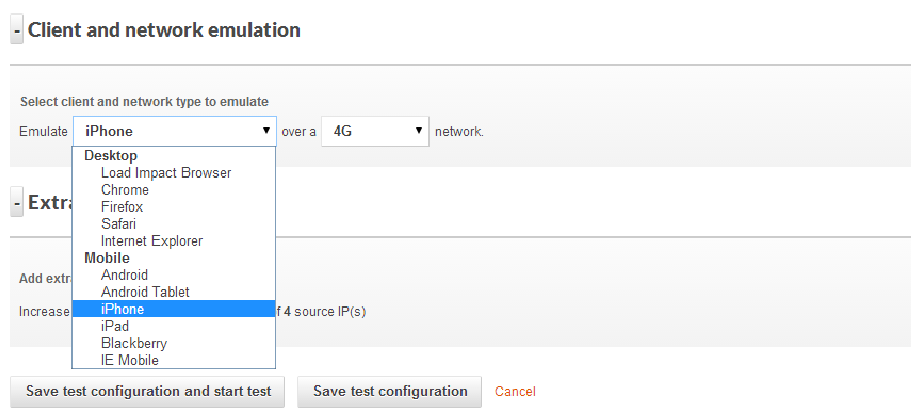
A realistic testing platform should simulate both desktop & mobile browsers

A realistic testing platform should simulate both desktop & mobile browsers

2.  Network Connections

One thing that’s for sure these days is an inconsistency when it comes to how users connect to an application.  Some users will have super low latency, google fiber connections (one can dream) that probably eclipse your datacenter circuit performance and others will be on a roaming 3G connection with tons of packet loss.

Even more challenging is what happens when a mobile user hands off from cellular data to WiFi and what that means to server resources (think  lots of FIN & WAIT TCP states) and experience.  A realistic test should include simulations for multiple connection types – DSL, 3G, LTE, unlimited, etc.  Even better would be a system that can introduce jitter and packet loss to mobile connections for the ultimate in realism and impact to server resources.

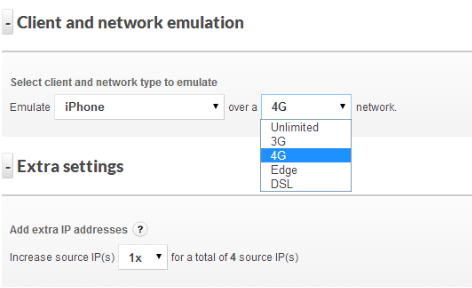
Being able to simulate different connection types and associated connection quality is also important

Being able to simulate different connection types and associated connection quality is also important

3.  Geo-Distributed Users

Users are going to be geographically distributed for just about any application these days, even intra-net only corporate applications. And they should expect a great user experience regardless of where they are.  At a bare minimum, testing within the continent where 80% of users will be located is recommended – going global is even better.  Being able to test from multiple geographies simultaneously during a single test is very valuable since you can then see exactly the differences in performance and user experience with the only variable being the user location.

If users are primarily US based then test multiple locations within the US - at least

If users are primarily US based then test multiple locations within the US – at least

However if users (or company execs) frequently travel abroad then test it!

However if users (or company execs) frequently travel abroad then test it!

A great user experience (sub 1-sec load times for example) is great but if that performance drops off a cliff as you move away from the datacenter then looking into a CDN (or a better CDN) may become a high priority.  If you are using distributed server resources and a complex CDN strategy, this is a great way to validate that all is working properly and you are getting the best value from the provider of choice.

The bane of most Ops teams’ existence is the “the app is slow” ticket, and the last thing a user will want to hear from a support reply is “not from here it’s not!”  A great way to identify early potential performance issues on a geographic basis is to continually test (ok maybe hourly or daily) and automate that process.

If a baseline is created then when performance numbers well outside of that reference range occur you can be proactive and not reactive.  If performance is slow from users in the UK but no where else and you have a quantitative analysis in hand, discussions with hosting and CDN providers takes on a much more productive tone.  Think of all the unnecessarily steps and level-1 troubleshooting that can be eliminated, all potentially before the first support ticket is opened for the UK slowness that you already were working on.

Consistently slower page load times from Australia might mean it's time for a new hosting resources or a CDN upgrade

Consistently slower page load times from Australia might mean it’s time for a new hosting resources or a CDN upgrade

With the tools available today, application teams have the ability to continuously test load and performance with highly realistic and sophisticated test scenarios. Performing this testing using a cloud based test platform removes on-premise test tool cost and deployment hassles and allows teams to test at every phase of a deployment including after the app goes live.

This type of approach can also help evaluate different hosting and CDN offerings well before the application goes live, and determine which providers offer the best value in the regions of the country or world you care most about. Taking a pro-active approach to monitoring the performance of applications, especially mobile applications where you are certain to face TCP connection issues, roaming from 4G to WiFI and a host of other mobile-centric challenges will go a long way to ensuring deployment success in a Dev-Ops fashion.


———–

Peter CannellThis post was written by Peter Cannell. Peter has been a sales and engineering professional in the IT industry for over 15 years. His experience spans multiple disciplines including Networking, Security, Virtualization and Applications. He enjoys writing about technology and offering a practical perspective to new technologies and how they can be deployed. Follow Peter on his blog or connect with him on Linkedin.

Don’t miss Peter’s next post, subscribe to the Load Impact blog by clicking the “follow” button below. 

5 Ways to Better Leverage a DevOps Mindset in Your Organization

The last few years have given rise to the “DevOps” methodology within many organizations both large and small. While definitions vary somewhat, it boils down to this: breaking down silos between developers and operations.

This seems like a common sense approach to running a business, right?

While many organizations do have a DevOps mindset, I find myself regularly talking to IT staff where there is near zero collaboration between applications teams, network and security. In highly silo-ed organizations these teams can actually work against each other and foster significant animosity. Not my idea of an efficient and agile organization!

Organizations that use a DevOps mindset will deploy applications and capabilities significantly faster and with fewer operational issues from what the industry is reporting.  According to Puppet Labs:

High performing organizations deploy code 30 times more often, and 8000 times faster than their peers, deploying multiple times a day, versus an average of once a month.

It is extremely important that applications teams are creating code and applications in a way that can be properly supported, managed and operationalized by the business. Here are some tips to best leverage this type of approach in any organization:

1. It’s not (entirely) about tools

Everyone loves to buy new technology and tools.  The problem is that often times products are only partially deployed, and capabilities go unused and sit on the shelf. And if you think starting to use some new products and tools will make your organization DevOps enabled, think again.

Building a DevOps culture is much more about taking two parts of the organization whose roots are quite different and bringing them together with a shared vision and goal. Think about it: operations looks at change as the reason the last downtime occurred and App-Dev is constantly trying to evolve and elicit disruptive change. No product or tool is going to make this all happen for you. So start with this in mind.

2. Communication and goals are absolutely critical

This is going to sound really obvious and boring, but if your ops and apps teams are not communicating – not working towards a shared set of goals – everyone is vested if you have a problem.

Defining what the organizational goals are in terms of real concrete objectives that meet the SMART criteria is the right place to start.  I’ll bet most organizations do not have goals that meet this level of specificity so I’ll provide a good and bad example:

  • Bad goal: “We want to be the leader in mobile code management”
  • Good goal: “We will be the leader in mobile code management by June 30th of 2015 as measured by Garnter’s magic quadrant, with revenues exceeding $25m in 2Q 2015″

See the difference?  Even the casual observer (who doesn’t even know what this fictitious space of mobile code management is) could tell if you met the second goal. Great. Now that we have a real concrete goal the organization can put an action plan in place to achieve those goals.

Communication can be a real challenge when teams have different reporting structures and are in different physical locations.  Even if folks are in the same building it’s really important for face to face, human interaction. It’s certainly easier to send an email or text but nothing beats in-person interaction with a regular cadence. Collaboration tools will certainly come into play as well – likely what you already have in place but there are new DevOps communications tools coming to market as well.  But first start with team meetings and breaking down barriers.

3. Practice makes perfect: continuous integration, testing and monitoring

DevOps is about short-circuiting traditional feedback control mechanisms to speed up all aspects of an application roll-out.  This means exactly the opposite of what we typically see in many large software programs and has been particularly acute within large government programs, or at least more visible.

Striving for perfection is certainly a worthy goal, but we should really be striving for better.  This means along the way risks will need to be taken, failures will happen and course corrections put in place.  It is important to realize that this whole DevOps change will be uncomfortable at first, but taking the initial steps and perfecting those steps will help build momentum behind the initiative.

Instead of trying to do every possible piece of DevOps all at once, start with one component such as GIT and learn how to really manage versioning well.Then start working with cookbooks and even use Chef to deploy Jenkins, cool eh?

It’s probably also worth noting that training and even hiring new talent could be a key driving factor in how quickly you implement this methodology.

4. Having the right tools helps

Like I said earlier, everyone loves new tools.. I love new tools!  Since this whole DevOps movement is quite new you should realize that the marketplace is evolving rapidly. What is hot and useful today could not be what you thought you needed tomorrow.

If you already have strong relationships with certain vendors and VAR partners this would be a great time to leverage their expertise in this area (assuming they have it) to look at where gaps exist and where the quick wins are.  If platform automation and consistency of configuration is the right place for the organization to start then going with Chef or Puppet could make sense.

I think the important factors here are:

      • What are your requirements?
      • What do you have budget do acquire and manage?
      • Do you have partners who can help you with requirements and matching up different vendors or service offerings?

Since this could easily turn into a whole series of blog posts on DevOps tools, I’m not going to go through all the different products out there. But if you can quickly answer the questions above, then get moving and don’t allow the DevOps journey to stall at this phase.

If it’s difficult to figure out exactly what requirements are important or you don’t have good partners to work with, then go partner with some of the best out there or copy what they are doing.

5. Security at the pace of DevOps

What about security? Building in security as part of the development process is critical to ensuring fatal flaws do not permeate a development program. Unfortunately, often times this is an afterthought.

Security hasn’t kept pace with software development by any metric so taking a fresh look at techniques and tools has to be done.

Static analysis tools and scanners aren’t terribly effective anymore (if they were to begin with). According to Contrast Security’s CTO and Founder, Jeff Williams, we should be driving towards continuous application security (aka. Rugged DevOps):

“Traditional application security works like waterfall software development – you perform a full security review at each stage before proceeding. That’s just incompatible with modern software development. Continuous application security (also known as Rugged DevOps) is an emerging practice that revolves around using automation and creating tests that verify security in real time as software is built, integrated, and operated. Not only does this eliminate traditional appsec bottlenecks, but it also enables projects to innovate more easily with confidence that they didn’t introduce a devastating vulnerability.”  – Jeff Williams

While DevOps is all about streamlining IT and bringing new applications to market faster, if you don’t ensure that the application can perform under a realistic load in a way real world users interact, there will be problems.

Likewise if an application is rolled out with security flaws that are overlooked or ignored, it could be game over for not only the business but quite possibly the CEO as well. Just look to Target as a very recent example.

It is clear that an integrated approach to developing applications is valuable to organizations, but if you don’t look at the whole picture – operational issues, performance under load and security, you could find out that DevOps was a fast track to disaster. And obviously no one wants that.


—————

Peter CannellThis post was written by Peter Cannell. Peter has been a sales and engineering professional in the IT industry for over 15 years. His experience spans multiple disciplines including Networking, Security, Virtualization and Applications. He enjoys writing about technology and offering a practical perspective to new technologies and how they can be deployed. Follow Peter on his blog or connect with him on Linkedin.

Uncover Hidden Performance Issues Through Continuous Testing

On-premise test tools, APMs, CEMs and server/network based monitoring solutions may not be giving you a holistic picture of your system’s performance; cloud-based continuous testing can.  

When it comes to application performance a wide array of potential causes of performance issues and end user dissatisfaction exist.  It is helpful to view the entire environment, from end user browser or mobile device all the way through to the web and application servers, as the complex system that it is.

system

Everything between the user’s browser or mobile and your code can affect performance

The state of the art in application performance monitoring has evolved to include on-premise test tools, Application Performance Management (APM) solutions, customer experience monitoring (CEM) solutions, server and network based monitoring. All of these technologies seek to determine root causes of performance problems, real or perceived by end users. Each of these technologies has it’s own merits and costs and seek to tackle the problem from different angles. Often a multifaceted approach is required when high value, mission critical applications are being developed and deployed.

On-premise solutions can blast the environment with 10+Gbit/sec of traffic in order to stress routers, switches and servers. These solutions can be quite complex and costly, and are typically used to validate new technology before it can be deployed in the enterprise.

APM solutions can be very effective in determining if network issues are causing performance problems or if the root cause is elsewhere. They will typically take packet data from a switch SPAN port or TAP (test access point), or possibly a tap-aggregation solution. APM solutions are typically “always-on” and can be an early warning system detecting applications problems before the help desk knows about an issue.  These systems can also be very complex and will require training & professional services to get the maximum value.

What all of these solutions lack is a holistic view of the system which has to take into account edge devices (Firewalls, Anti-Malware, IPS, etc), network connectivity and even endpoint challenges such as packet loss and latency of mobile connections. Cloud-based testing platforms such as Load Impact allow both developers and application owners to implement a continuous testing methodology that can shed light on issues that can impact application performance that might be missed by other solutions.

A simply way to accomplish this is to perform a long-term (1 to 24+ hr) application response test to look for anomalies that can crop up at certain times of day.  In this example I compressed the timescale and introduced my own anomalies to illustrate the effects of common infrastructure changes.

The test environment is built on an esxi platform and includes a 10gbit virtual network, 1gbit physical LAN, Untangle NG Firewall and a 50/5 mbit/sec internet link.  For the purposes of this test the production configuration of the Untangle NG Firewall was left intact – including Firewall rules, IPS protections however QoS was disabled.  Turnkey Linux was used for the Ubuntu-based Apache webserver with 8 CPU cores and 2 gigs of ram.

It was surprising to me what did impact response times and what had no effect whatsoever.  Here are a few examples:

First up is the impact of bandwidth consumption on the link serving the webserver farm.  This was accomplished by saturating the download link with traffic, and as expected it had a dramatic impact on application response time:

Impact of download activity on application response times

At approx 14:13 link saturation occurred (50Mbit) and application response times nearly tripled as a result

bandwidth

Snapshot of the Untangle Firewall throughput during link saturation testing

Next up is executing a Vmware snapshot of the webserver.  I fully expected this to impact response times significantly, but the impact is brief.  If this was a larger VM then the impact could have been longer in duration:

impact-of-snapshot-on-apache-VM

This almost 4x spike in response time only lasts a few seconds and is the result of a VM snapshot

Lastly was a test to simulate network congestion on the LAN segment where the webserver is running.  

This test was accomplished using Iperf to generate 6+ Gbit/sec of network traffic to the webserver VM.  While I fully expected this to impact server response times, the fact that it did not is a testament to how good the 10gig vmxnet3 network driver is:

iperf

Using Iperf to generate a link-saturating 15+Gbit/sec of traffic to Apache (Ubuntu on VM)


simulate network congestion using iperf 2

In this test approx 5.5Gbit/sec was generated to the webserver,no impact whatsoever in response times

Taking a continuous monitoring approach for application performance has benefits to not only application developers and owners, but those responsible for network, security and server infrastructure.  The ability to pinpoint the moment when performance degrades and correlate that with server resources (using the Load Impact Server Metrics Agent) and other external events is very powerful.  

Often times application owners do not have control or visibility into the entire infrastructure and having concrete “when and where” evidence makes having conversations with other teams in the organization more productive.

———-

Peter CannellThis post was written by Peter Cannell. Peter has been a sales and engineering professional in the IT industry for over 15 years. His experience spans multiple disciplines including Networking, Security, Virtualization and Applications. He enjoys writing about technology and offering a practical perspective to new technologies and how they can be deployed. Follow Peter on his blog or connect with him on Linkedin.

About Load Impact

Load Impact is the leading cloud-based load testing software trusted by over 123,000 website, mobile app and API developers worldwide.

Companies like JWT, NASDAQ, The European Space Agency and ServiceNow have used Load Impact to detect, predict, and analyze performance problems.
 
Load Impact requires no download or installation, is completely free to try, and users can start a test with just one click.
 
Test your website, app or API at loadimpact.com

Enter your email address to follow this blog and receive notifications of new posts by email.