5 Ways to Better Leverage a DevOps Mindset in Your Organization

The last few years have given rise to the “DevOps” methodology within many organizations both large and small. While definitions vary somewhat, it boils down to this: breaking down silos between developers and operations.

This seems like a common sense approach to running a business, right?

While many organizations do have a DevOps mindset, I find myself regularly talking to IT staff where there is near zero collaboration between applications teams, network and security. In highly silo-ed organizations these teams can actually work against each other and foster significant animosity. Not my idea of an efficient and agile organization!

Organizations that use a DevOps mindset will deploy applications and capabilities significantly faster and with fewer operational issues from what the industry is reporting.  According to Puppet Labs:

High performing organizations deploy code 30 times more often, and 8000 times faster than their peers, deploying multiple times a day, versus an average of once a month.

It is extremely important that applications teams are creating code and applications in a way that can be properly supported, managed and operationalized by the business. Here are some tips to best leverage this type of approach in any organization:

1. It’s not (entirely) about tools

Everyone loves to buy new technology and tools.  The problem is that often times products are only partially deployed, and capabilities go unused and sit on the shelf. And if you think starting to use some new products and tools will make your organization DevOps enabled, think again.

Building a DevOps culture is much more about taking two parts of the organization whose roots are quite different and bringing them together with a shared vision and goal. Think about it: operations looks at change as the reason the last downtime occurred and App-Dev is constantly trying to evolve and elicit disruptive change. No product or tool is going to make this all happen for you. So start with this in mind.

2. Communication and goals are absolutely critical

This is going to sound really obvious and boring, but if your ops and apps teams are not communicating – not working towards a shared set of goals – everyone is vested if you have a problem.

Defining what the organizational goals are in terms of real concrete objectives that meet the SMART criteria is the right place to start.  I’ll bet most organizations do not have goals that meet this level of specificity so I’ll provide a good and bad example:

  • Bad goal: “We want to be the leader in mobile code management”
  • Good goal: “We will be the leader in mobile code management by June 30th of 2015 as measured by Garnter’s magic quadrant, with revenues exceeding $25m in 2Q 2015″

See the difference?  Even the casual observer (who doesn’t even know what this fictitious space of mobile code management is) could tell if you met the second goal. Great. Now that we have a real concrete goal the organization can put an action plan in place to achieve those goals.

Communication can be a real challenge when teams have different reporting structures and are in different physical locations.  Even if folks are in the same building it’s really important for face to face, human interaction. It’s certainly easier to send an email or text but nothing beats in-person interaction with a regular cadence. Collaboration tools will certainly come into play as well – likely what you already have in place but there are new DevOps communications tools coming to market as well.  But first start with team meetings and breaking down barriers.

3. Practice makes perfect: continuous integration, testing and monitoring

DevOps is about short-circuiting traditional feedback control mechanisms to speed up all aspects of an application roll-out.  This means exactly the opposite of what we typically see in many large software programs and has been particularly acute within large government programs, or at least more visible.

Striving for perfection is certainly a worthy goal, but we should really be striving for better.  This means along the way risks will need to be taken, failures will happen and course corrections put in place.  It is important to realize that this whole DevOps change will be uncomfortable at first, but taking the initial steps and perfecting those steps will help build momentum behind the initiative.

Instead of trying to do every possible piece of DevOps all at once, start with one component such as GIT and learn how to really manage versioning well.Then start working with cookbooks and even use Chef to deploy Jenkins, cool eh?

It’s probably also worth noting that training and even hiring new talent could be a key driving factor in how quickly you implement this methodology.

4. Having the right tools helps

Like I said earlier, everyone loves new tools.. I love new tools!  Since this whole DevOps movement is quite new you should realize that the marketplace is evolving rapidly. What is hot and useful today could not be what you thought you needed tomorrow.

If you already have strong relationships with certain vendors and VAR partners this would be a great time to leverage their expertise in this area (assuming they have it) to look at where gaps exist and where the quick wins are.  If platform automation and consistency of configuration is the right place for the organization to start then going with Chef or Puppet could make sense.

I think the important factors here are:

      • What are your requirements?
      • What do you have budget do acquire and manage?
      • Do you have partners who can help you with requirements and matching up different vendors or service offerings?

Since this could easily turn into a whole series of blog posts on DevOps tools, I’m not going to go through all the different products out there. But if you can quickly answer the questions above, then get moving and don’t allow the DevOps journey to stall at this phase.

If it’s difficult to figure out exactly what requirements are important or you don’t have good partners to work with, then go partner with some of the best out there or copy what they are doing.

5. Security at the pace of DevOps

What about security? Building in security as part of the development process is critical to ensuring fatal flaws do not permeate a development program. Unfortunately, often times this is an afterthought.

Security hasn’t kept pace with software development by any metric so taking a fresh look at techniques and tools has to be done.

Static analysis tools and scanners aren’t terribly effective anymore (if they were to begin with). According to Contrast Security’s CTO and Founder, Jeff Williams, we should be driving towards continuous application security (aka. Rugged DevOps):

“Traditional application security works like waterfall software development – you perform a full security review at each stage before proceeding. That’s just incompatible with modern software development. Continuous application security (also known as Rugged DevOps) is an emerging practice that revolves around using automation and creating tests that verify security in real time as software is built, integrated, and operated. Not only does this eliminate traditional appsec bottlenecks, but it also enables projects to innovate more easily with confidence that they didn’t introduce a devastating vulnerability.”  – Jeff Williams

While DevOps is all about streamlining IT and bringing new applications to market faster, if you don’t ensure that the application can perform under a realistic load in a way real world users interact, there will be problems.

Likewise if an application is rolled out with security flaws that are overlooked or ignored, it could be game over for not only the business but quite possibly the CEO as well. Just look to Target as a very recent example.

It is clear that an integrated approach to developing applications is valuable to organizations, but if you don’t look at the whole picture – operational issues, performance under load and security, you could find out that DevOps was a fast track to disaster. And obviously no one wants that.


—————

Peter CannellThis post was written by Peter Cannell. Peter has been a sales and engineering professional in the IT industry for over 15 years. His experience spans multiple disciplines including Networking, Security, Virtualization and Applications. He enjoys writing about technology and offering a practical perspective to new technologies and how they can be deployed. Follow Peter on his blog or connect with him on Linkedin.

Test Driven Development and CI using JavaScript [Part I]

In this tutorial, we will learn how to apply TDD (Test-Driven Development) using JavaScript code. This is the first part of a set of tutorials that includes TDD and CI (Continuous Integration) using JavaScript as the main language.

Some types of testing

There are several approaches for testing code and each come with their own set of challenges. Emily Bache, author of The Coding Dojo Handbook, writes about them in more detail on her blog – “Coding is like cooking

1. Test Last: in this approach, you code a solution and subsequently create the test cases.

  • Problem 1: It’s difficult to create test cases after the code is completed.
  • Problem 2: If test cases find an issue, it’s difficult to refactor the completed code.

2. Test First: you design test cases and then write the code.

  • Problem 1: You need a good design and formulating test cases increases the design stage, which takes too much time.
  • Problem 2: Design issues are caught too late in the coding process, which makes refactoring the code more difficult due to specification changes in the design. This issue also leads to scope creep.

TDD-diagram-1

3. Test-Driven: You write test cases parallel to new coding modules. In other words, you add a task for unit tests as your developers are assigned different coding tasks during the project development stage.

TDD-diagram-2


TDD approach

TDD focuses on writing code at the same time as you write the tests. You write small modules of code, and then write your tests shortly after.

Patterns to apply to the code:

  • Avoid direct calls over the network or to the database. Use interfaces or abstract classes instead.
  • Implement a real class that implements the network or database call and a class which simulates the calls and returns quick values (Fakes and Mocks).
  • Create a constructor that uses Fakes or Mocks as a parameter in its interface or abstract class.

Patterns to apply to unit tests: 

  • Use the setup function to initialize the testing, which initializes common behavior for the rest of the unit test cases.
  • Use the TearDown function to release resources after a unit test case has finalized.
  • Use “assert()” to verify the correct behavior and results of the code during the unit test cases.
  • Avoid dependency between unit test cases.
  • Test small pieces of code.


Behavior-Driven Development

Behavior-Driven Development (BDD) is a specialized version of TDD focused on behavioral specifications. Since TDD does not specify how the test cases should be done and what needs to be tested, BDD was created in response to these issues.

Test cases are written based on user stories or scenarios. Stories are established during the design phase. Business analysts, managers and project/product managers gather the design specifications, and then users explain the logical functionality for each control. Specifications also include a design flow so test cases can validate proper flow.

This is an example of the language used to create a BDD test story:

Story: Returns go to stock

In order to keep track of stock

As a store owner

I want to add items back to stock when they’re returned


Scenario 1Refunded items should be returned to stock

Given a customer previously bought a black sweater from me

And I currently have three black sweaters left in stock

When he returns the sweater for a refund

Then I should have four black sweaters in stock


Scenario 2:  Replaced items should be returned to stock

Given that a customer buys a blue garment

And I have two blue garments in stock

And three black garments in stock.

When he returns the garment for a replacement in black,

Then I should have three blue garments in stock

And two black garments in stock


Frameworks to Install

1. Jamine

Jasmine  is a set of standalone libraries that allow you to test JavaScript based on BDD. These libraries do not require DOM, which make them perfect to test on the client side and the server side. You can download it from http://github.com/pivotal/jasmine

It is divided into suites, specs and expectations

.Suites define the unit’s story. 

.Specs define the scenarios. 

.Expectations define desired behaviors and results. 

Jasmine has a set of helper libraries that lets you organize tests.  

2. RequreJS

RequireJS is a Javascript library that allows you to organize code into modules, which load dynamically on demand.

By dividing code into modules, you can speed up the load-time for application components and have better organization of your code.

You can download RequireJS from http://www.requirejs.org

Part II of this two part tutorial will discuss Behavioral Driven Testing and Software Testing – how to use BDD to test your JavaScipt code. Don’t miss out, subscribe to our blog below. 

————-

avatar

This post was written by Miguel Dominguez. Miguel is currently Senior Software Developer at digitallabs AB but also works as a freelance developer. His focus is on mobile application (android) development, web front-end development (javascript, css, html5) and back-end (mvc, .net, java). Follow Miguel’s blog.

Uncover Hidden Performance Issues Through Continuous Testing

On-premise test tools, APMs, CEMs and server/network based monitoring solutions may not be giving you a holistic picture of your system’s performance; cloud-based continuous testing can.  

When it comes to application performance a wide array of potential causes of performance issues and end user dissatisfaction exist.  It is helpful to view the entire environment, from end user browser or mobile device all the way through to the web and application servers, as the complex system that it is.

system

Everything between the user’s browser or mobile and your code can affect performance

The state of the art in application performance monitoring has evolved to include on-premise test tools, Application Performance Management (APM) solutions, customer experience monitoring (CEM) solutions, server and network based monitoring. All of these technologies seek to determine root causes of performance problems, real or perceived by end users. Each of these technologies has it’s own merits and costs and seek to tackle the problem from different angles. Often a multifaceted approach is required when high value, mission critical applications are being developed and deployed.

On-premise solutions can blast the environment with 10+Gbit/sec of traffic in order to stress routers, switches and servers. These solutions can be quite complex and costly, and are typically used to validate new technology before it can be deployed in the enterprise.

APM solutions can be very effective in determining if network issues are causing performance problems or if the root cause is elsewhere. They will typically take packet data from a switch SPAN port or TAP (test access point), or possibly a tap-aggregation solution. APM solutions are typically “always-on” and can be an early warning system detecting applications problems before the help desk knows about an issue.  These systems can also be very complex and will require training & professional services to get the maximum value.

What all of these solutions lack is a holistic view of the system which has to take into account edge devices (Firewalls, Anti-Malware, IPS, etc), network connectivity and even endpoint challenges such as packet loss and latency of mobile connections. Cloud-based testing platforms such as Load Impact allow both developers and application owners to implement a continuous testing methodology that can shed light on issues that can impact application performance that might be missed by other solutions.

A simply way to accomplish this is to perform a long-term (1 to 24+ hr) application response test to look for anomalies that can crop up at certain times of day.  In this example I compressed the timescale and introduced my own anomalies to illustrate the effects of common infrastructure changes.

The test environment is built on an esxi platform and includes a 10gbit virtual network, 1gbit physical LAN, Untangle NG Firewall and a 50/5 mbit/sec internet link.  For the purposes of this test the production configuration of the Untangle NG Firewall was left intact – including Firewall rules, IPS protections however QoS was disabled.  Turnkey Linux was used for the Ubuntu-based Apache webserver with 8 CPU cores and 2 gigs of ram.

It was surprising to me what did impact response times and what had no effect whatsoever.  Here are a few examples:

First up is the impact of bandwidth consumption on the link serving the webserver farm.  This was accomplished by saturating the download link with traffic, and as expected it had a dramatic impact on application response time:

Impact of download activity on application response times

At approx 14:13 link saturation occurred (50Mbit) and application response times nearly tripled as a result

bandwidth

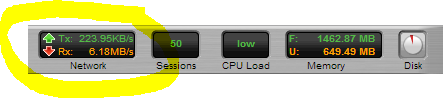
Snapshot of the Untangle Firewall throughput during link saturation testing

Next up is executing a Vmware snapshot of the webserver.  I fully expected this to impact response times significantly, but the impact is brief.  If this was a larger VM then the impact could have been longer in duration:

impact-of-snapshot-on-apache-VM

This almost 4x spike in response time only lasts a few seconds and is the result of a VM snapshot

Lastly was a test to simulate network congestion on the LAN segment where the webserver is running.  

This test was accomplished using Iperf to generate 6+ Gbit/sec of network traffic to the webserver VM.  While I fully expected this to impact server response times, the fact that it did not is a testament to how good the 10gig vmxnet3 network driver is:

iperf

Using Iperf to generate a link-saturating 15+Gbit/sec of traffic to Apache (Ubuntu on VM)


simulate network congestion using iperf 2

In this test approx 5.5Gbit/sec was generated to the webserver,no impact whatsoever in response times

Taking a continuous monitoring approach for application performance has benefits to not only application developers and owners, but those responsible for network, security and server infrastructure.  The ability to pinpoint the moment when performance degrades and correlate that with server resources (using the Load Impact Server Metrics Agent) and other external events is very powerful.  

Often times application owners do not have control or visibility into the entire infrastructure and having concrete “when and where” evidence makes having conversations with other teams in the organization more productive.

———-

Peter CannellThis post was written by Peter Cannell. Peter has been a sales and engineering professional in the IT industry for over 15 years. His experience spans multiple disciplines including Networking, Security, Virtualization and Applications. He enjoys writing about technology and offering a practical perspective to new technologies and how they can be deployed. Follow Peter on his blog or connect with him on Linkedin.

Automated Acceptance Testing with Load Impact and TeamCity (New Plugin)

teamcity512

As you know, Continuous Integration (CI) is used by software engineers to merge multiple developers’ work several times a day. And load testing is how companies make sure that code performs well under normal or heavy use.

So, naturally, we thought it wise to develop a plugin for one of the most widely used CI servers out there – TeamCity by JetBrains. TeamCity is used by developers at a diverse set of industry leaders around the world – from Apple, Twitter and Intel, to Boeing, Volkswagen and Bank of America. It’s pretty awesome!

The new plugin gives TeamCity users access to multi-source load testing from up to 12 geographically distributed locations worldwide, advanced scripting, a Chrome Extension  to easily create scenarios simulating multiple typical users, and Load Impact’s Server Metrics Agent (SMA) for correlating the server side impact of testing – like CPU, memory, disk space and network usage.

Using our plugin for TeamCity makes it incredibly easy for companies to add regular, automated load tests to their nightly test suites, and as a result, get continuous feedback on how their evolving code base is performing. Any performance degradation, or improvement is detected immediately when the code that causes it is checked in, which means developers always know if their recent changes were good or bad for performance – they’re guided to writing code that performs well.


Here’s how Load Impact fits in the TeamCity CI workflow:CD-TeamCity


TeamCity-Button


Once you have the plugin installed, follow this guide for installing and configuring the Load Impact plugin for TeamCity. 

Performance Testing Versus Performance Tuning

Performance testing is often mistaken for performance tuning. The two are related, but they are certainly not the same thing. To see what these differences are, let’s look at a quick analogy.

Most governments mandate that you bring your vehicles to the workshop for an inspection once a year. This is to ensure that your car meets the minimum safety standards that have been set to ensure it is safe for road use. A website performance test can be likened to a yearly inspection – It ensures that your website isn’t performing terribly and should perform reasonably well under most circumstances.

When the inspection shows that the vehicle isn’t performing up to par, we start running through a small series of checks to see how to get the problem solved in order to pass the inspection. This is similar to performance tuning, where we shift our focus to discovering what is necessary to making the application perform acceptably.

Looking in depth at the performance test results helps you to narrow down the problematic spots so you can identify your bottlenecks quicker. This in turn helps you to make optimization adjustments cost and time efficient.

Then we have the car enthusiasts. This group constantly works toward tuning their vehicle for great performance. Their vehicles have met the minimum performance criteria, but their goal now is to probably make their car more energy-efficient, or perhaps to run faster. Performance tuning goals are simply that – You might be aiming to reduce the amount of resources consumed to decrease the volume of hardware needed, and/or to get your website to load resources quicker.

Next, we will talk about the importance of establishing a baseline when doing performance tuning.

Tuning your website for consistent performance

Now that we know the difference between performance testing and performance tuning, let’s talk about why you will need a controlled environment and an established baseline prior to tuning web applications.

The importance of a baseline: Tuning your web application is an iterative process. There might be several factors contributing to poor website performance, and it is recommended to make optimization adjustments in small steps in a controlled test environment. Baselines help to determine whether an adjustment to your build or version improves or declines performance. If the conditions of your environment are constantly changing or too many large changes are made at once, it will be difficult to see where the impact of your optimization efforts come from.

To establish a baseline, try tracking specific criteria such as page load times, bandwidth, requests per second, memory and CPU usage. Load Impact’s server metrics helps to combine all these areas in a single graph from the time you run your first performance test. Take note of how these changes improve or degrade when you make optimization improvements (i.e. if you have made hardware upgrades).

Remember that baselines can evolve over time, and might need to be redefined if changes to the system have been made since the time the baseline was initially recorded.If your web application is constantly undergoing changes and development work, you might want to consider doing small but constant tests prior to, for instance, a new fix being integrated or a new version launch.

As your product development lifecycle changes, so will your baseline. Hence, doing consistent testing prior to a release helps save plenty of time and money by catching performance degradation issues early.

There is an increasing number of companies adopting a practice known as Continuous Integration. This practice helps to identify integration difficulties and errors through a series of automated checks, to ensure that code deployment is as smooth and rapid as possible.

If this is something that your company already practices, then integrating performance tuning into your product delivery pipeline might be as simple as using Load Impact’s Continuous Delivery Jenkins plugin. A plugin like this allows you to quickly integrate Jenkins with our API to allow for automated testing with a few simple clicks.

By Chris Chong (@chrishweehwee)

Write Scalable Code – use Jenkins to Automate your Load Testing

Starting today, we’re  accepting applications for early access to our new Load Impact Continuous Delivery service, which for the first time allows developers of websites, apps and APIs to make stress testing an integrated part of their continuous delivery process.

Our Continuous Delivery service comprises our API, SDKs and a library of plug-ins and integrations for popular continuous delivery systems – starting with Jenkins.

Easy to USe and Flexible Graph png

In order to better serve our customers and allow them to integrate their Continuous Delivery methodology with the Load Impact platform, we’re building programming libraries that make the API super easy to use. We’re starting with Jenkins and will soon rollout plug-ins for TeamCity, New Relic and CloudBees.

Simply put, the Jenkins plug-in will integrate load testing into developers’ automated Jenkins test suite to determine whether new builds meet specified traffic performance criteria.

(Download the plug-in)

The new Jenkins plug-in features multi-source load testing from up to 12 geographically distributed locations worldwide, advanced scripting, a GUI based session recorder to easily create tests simulating multiple typical user scenarios, and our new Server Metrics Agent (SMA) for correlating the Server Side impact of users on CPU, memory, disk space and network usage.

Read more about how to automate your load testing here and here.

Apply now to join our private beta group and receive FREE unlimited load testing for the duration of the beta period!

Automating Load Testing to Improve Web Application Performance

This blog post was originally written for the Rackspace DevOps blog. Check out this post and more great dev advice on their blog.

…….

Web application performance is a moving target. During design and implementation, a lot of big and small decisions are made that affect application performance – for good and bad. You’ve heard it before. But since performance can be ruined many times throughout a project, good application performance simply can not be added as an extra feature at the end of a project.

The modern solution to mitigate quality problems throughout the application development life cycle is called Continuous Integration, or just CI. The benefits of using CI are many, but for me, the most important factor for embracing CI is the ability to run automated tests frequently and to trace application performance, since such tests need to be added to the stack of automated tests already being generated. If you have load tests carried out throughout your project development, you can proactively trace how performance is affected.

The key is being able to automate load testing. But how do we do that? Naturally, it depends on your environment. Assuming that you’re building a web application and that your build environment is already in the cloud, it would be ideal to start using a cloud based load testing service such as Load Impact to automatically generate load and measure performance. In fact, libcurl will get you almost all the way.

Load Impact’s Continuous Delivery API was created to enable developers to run load tests programmatically. It’s an http based REST API that uses JSON for passing parameters. In its most basic form, you can run the following from a command line:

$ curl -X POST https://api.loadimpact.com/v2/test-configs/X/start -u token: {"id":Y}
$ curl -X GET https://api.loadimpact.com/v2/tests/Y/results -u token: > out.json

In this example X = the LoadImpact test config id, Y = the test result id and token = your LoadImpact API token. Please note that token is sent as an http username but with a blank password.

Since JSON is not that easy to work with from the command line, using PHP or Perl to wrap the calls in a script makes sense. A more complete sample doesn’t really fit into this blog post, but at a pseudo level you want to:

<?php

$token = '123456789';
$urlbase = 'https://api.loadimpact.com/v2/';
$config_id = 999;

// Start test and get id from JSON return
$test = http_post($urlbase . "/test-configs/$config_id/start"));

$done = FALSE;
while(!$done) {
  sleep(30);
  $status = http_get($urlbase . "/tests/{$test->id}");
  $if($status->status > 2) $done = TRUE;
}

$result = http_get($urlbase . "/tests{$test-id}/results");
$last = count($results->__li_user_load_time); 
echo $results->__li_user_load_time[$last]->value; ?>

First, some variables are set, the existing test configuration id and my API token being the most interesting.

Second, I ask Load Impact to launch the test configuration and store the test id. Wait for the test to finish by asking for its status code every 30 seconds.

Lastly, when I know the test if finished, I ask for the test result that I can then query for values. In this example, I simply echo the last measurement of the actual load time. If needed, the Load Impact API also allows me to manipulate the target URL before I launched the test, change the number of simulated users or make other relevant changes.

Running repeated load test as part of your CI solution will reveal a lot about how an application’s performance is affected by all those small decisions.

Note that you probably don’t want to run a full set of exhaustive performance tests at every build. I recommend that a few well-selected tests are executed. The key is to get a series of measurements that can be tracked over time.

About Load Impact

Load Impact is the leading cloud-based load testing software trusted by over 123,000 website, mobile app and API developers worldwide.

Companies like JWT, NASDAQ, The European Space Agency and ServiceNow have used Load Impact to detect, predict, and analyze performance problems.
 
Load Impact requires no download or installation, is completely free to try, and users can start a test with just one click.
 
Test your website, app or API at loadimpact.com

Enter your email address to follow this blog and receive notifications of new posts by email.