We’re Hiring! Front End Lead Based in Stockholm

We are looking for a front end expert to take on the role of lead front end developer for the loadimpact.com site and application, being a part of our upcoming redesign of the whole site, service and user flow.

What is loadimpact.com then?

Load Impact is the world’s most widely used online load testing service, with over 100,000 users from 190+ countries and over a million executed load tests – Google “web load test”!

The company is small but very experienced in developing applications for performance testing and monitoring. We started out as a software development consulting company way back in 2000, developing performance test and measurement software for customers such as Nasdaq and the European space agency. We wrote both hardcore, low-level networking software and high-level web user interfaces and became quite good at both of those things. We pride ourselves on understanding the lower levels of a networked application while at the same time realizing how incredibly important UX is. In 2009 we took the step and launched loadimpact.com, becoming a product company rather than a consulting company, and we have never looked back.

We are located in Stockholm, Sweden and San Francisco, USA. This job opening is in Stockholm.

This is a chance to get the best of both worlds – you get to build something practically from scratch and decide how to do things while at the same time you’re supported by a successful, global business with a very strong user base and sound financial backing. You will be part of a small and very competent dev team, using the latest and greatest technologies and working in a modern and agile environment.

Being part of a small team means you get a lot of say in what happens in general, and can influence your own work situation. As a company, we are very “flat” (no hierarchies) and that means you’ll have a say in most decisions we make as a company, if you want to.

You need to be really, really good at:

HTML, CSS & Javascript

You need to be be knowledgeable about:

Usability / UI design
Common JS libraries/frameworks
Browser support/portability/quirks
Common data formats: JSON, XML
Responsive design

You should have some knowledge or experience of:

Client-side optimization (minification, sprites, lazy-loading etc)
Git / Github
SEO basics (the common-sense stuff, no black hat tricks thank you)
Common web servers: Apache, Nginx
Web analytics & growth hacking
SQL
Cloud operations (e.g. using Amazon EC2 and/or other AWS services)
Web application protocols: HTTP, HTTPS

The office is located in Stockholm, Sweden. A very scenic city, with excellent infrastructure, clean streets, low crime, many bars, fantastic coffee. A bit cool in winter, but who cares, we just buy more coffee. There is also a very vibrant tech startup scene in Stockholm, much thanks to companies like Spotify, Skype, King.com (Candy crush), Mojang (Minecraft) and others that started and are still operating here. The city is attracting more and more world-class IT entrepreneurs and developers – it is a very dynamic environment to work in, with a lot of industry colleagues to hang out with and learn from. Our office is very centrally located, by the way, with a fantastic view of the city harbour 🙂


photo

Actual view from our desks!

How to apply:

Email your resume and info to ragnar@loadimpact.com.

We look froward to hearing from you!

Deadline July 1, 2014.

Exception Handling in an AngularJS Web Application (Tutorial)

During this tutorial I will implement best practices for exception handling in an AngularJS web application.

I’ll start creating the structure of a demo application, throw some test exceptions and intercept them.

The second part of this tutorial will cover some frameworks that will help you organize your exception logs using Raven with Sentry.

Creating web app structure

Note: You can skip this section if you already know how to setup your web application with Yeoman and AngularJS.

In order to use Yeoman to create a basic structure of your web app with AngularJS, you need to have installed Yeoman on your computer. A basic tutorial to install it can be found here: http://yeoman.io/gettingstarted.html

Once installed, run the following command and follow the instructions. When asked to install SASS, reply “N”. Rest of settings/questions can be set as default.

$ mkdir exceptionHandling
$ cd exceptionHandling
$ yo angular

The command will create a structure where you can find the structure of your web app and other files to configure it with Grunt and Bower (for more information, check http://gruntjs.com/ and http://bower.io/).

Now you are ready to execute your AngularJS application. Open a terminal and navigate to the root of your application. Run the following command to keep the web application running in the background:

$ grunt serve

Now, open your browser with the following url:

http://localhost:9001

Exceptions and Promises

Exceptions

In order to keep a good structure of your exceptions, create an object for every throw exception. The structure of this thrown object should look like this (this is just an example):

function MyException(message) {
  this.name = 'MyException';
  this.message= message;
}
MyException.prototype = new Error();
MyException.prototype.constructor = MyException;

Then, you can throw the exceptions as error objects:

throw new MyException('Something was wrong!');

Promises

Promise is an interface class that helps you to control if the call to a function – that may be executed asynchronously – has finished successfully or with an error. It is very similar to have a try-catch-finally block for async calls.

This is just an example:

function myAsyncFunction() {
  var deferred = $q.defer();
  // Doing something async...
  setTimeout(function() {

    // Notify AngularJS model about changes
    scope.$apply(function() {
      deferred.notify('Async method has ended.');
      
      /* This is just a random boolean value for the demo */
      var randomResult = (Math.random(2).toFixed(1) * 10) % 2;

      if (randomResult) {
        deferred.resolve('OK');
      } else {
        deferred.reject('FAIL');
      }
    });
  }, 1000);
  return deferred;
}

Then, you can call to your async function obtaining the results with the promise interface:

myAsyncFunction()
  .then(successCallback)
  .catch (errorCallback)
  .finally(alwaysCallback);

Throwing some exceptions

Now add to your controller a function that raises an exception. Open the file under the path app/scripts/controllers/main.js and write this content:

'use strict';

angular.module('exceptionHandlingApp')
  .controller('MainCtrl', ['$scope', '$q',
    function($scope, $q) {
      function MainCtrlInitException(message) {
        this.name = 'MainCtrlInitException';
        this.message = message;
      }
      MainCtrlInitException.prototype = new Error();
      MainCtrlInitException.prototype.constructor = MainCtrlInitException;

      function init() {
        /* We just reject the promise of this function. Only for the demo */
        return $q.reject("Cannot init");
      }

      init().
      catch (
        function(cause) {
          throw new MainCtrlInitException(cause);
        });
    }
  ]);

As you can see in the example, in the function “init”, I reject the promise that will cause the catch interface to be called. Then, I throw a custom exception.

Opening the console of your browser, you should see the results of this exception.

Intercepting exceptions with Decorators

AngularJS has its own exception handler. You can override it with a Decorator that helps you to extend the functionality of an object in AngularJS.

You can create a new Decorator using Yeoman Angular Generator in the terminal applying the following command:

$ yo angular:decorator customExceptionHandler

This command will create a new file under the path: app/scripts/decorators/customExceptionHandlerDecorator.js

Replace its content with the following code:

'use strict';

angular.module('exceptionHandlingApp')
  .config(function($provide) {
    $provide.decorator('$exceptionHandler', ['$log', '$delegate',
      function($log, $delegate) {
        return function(exception, cause) {
          $log.debug('Default exception handler.');
          $delegate(exception, cause);
        };
      }
    ]);
  });

In your browser, you should see the new result or your exception handler:

Image-One-2

Intercepting exceptions with Sentry

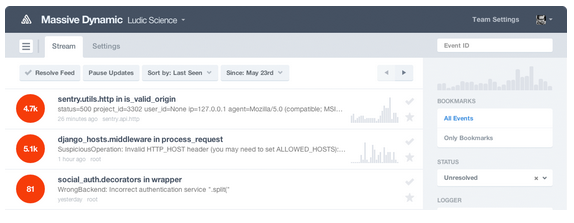
Sentry is a system that helps you organize your exceptions using a web application. You can setup an account on getsentry.com or install it on your own server. You will need to create a new project and obtain the API key to interact with your application.

Image-2

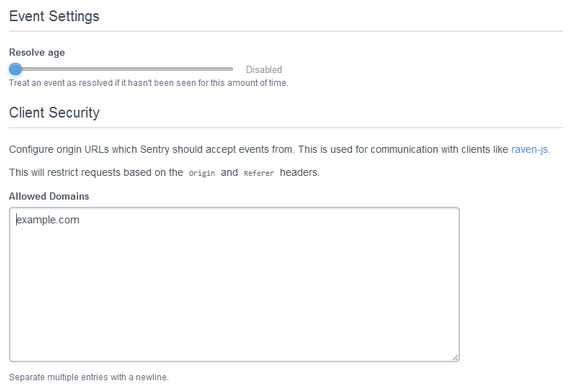
Be sure that you configure your hosts file to point your localhost as another domain.

In windows, you can find this file under “%SYSTEMROOT%\System32\drivers\etc\hosts” or in Linux/Mac under “/etc/hosts”

For example, you can use:

127.0.0.1   example.com

And configure Sentry to accept calls from example.com

Image-3

In order to interact with Sentry, we will need to use RavenJS with Sentry. On the bottom of your app/index.html file, before the last body tag, add the following line:

<scriptsrc="//cdn.ravenjs.com/1.1.14/jquery,native/raven.min.js"></script>

Then, modify app/scripts/app.js using the API key obtained from Sentry:

/* global Raven:true */
'use strict';

angular
  .module('exceptionHandlingApp', [
    'ngCookies',
    'ngResource',
    'ngSanitize',
    'ngRoute'
  ])
  .config(function ($routeProvider) {
      Raven.config('https://7be...............491@app.getsentry.com/2...2', {
        logger: 'Error Handling Demo',
      }).install();

    $routeProvider
      .when('/', {
        templateUrl: 'views/main.html',
        controller: 'MainCtrl'
      })
      .otherwise({
        redirectTo: '/'
      });
  });
 .otherwise({
        redirectTo: '/'
      });
  });

You will create a Decorator that interacts with Sentry, sending the exceptions to that server. You can use Yeoman Angular Generator:

$ yo angular:decorator sentryExceptionHandler

And replace the content of the file under app/scripts/decorators/sentryExceptionHandlerDecorator.js

/* global Raven:true */
'use strict';

angular.module('exceptionHandlingApp')
  .config(function($provide) {
    $provide.decorator('$exceptionHandler', ['$log', '$delegate',
      function($log, $delegate) {
        return function(exception, cause) {
          $log.debug('Sentry exception handler.');
          Raven.captureException(exception);
          $delegate(exception, cause);
        };
      }
    ]);
  });

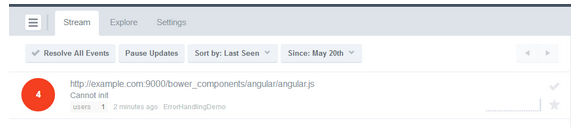
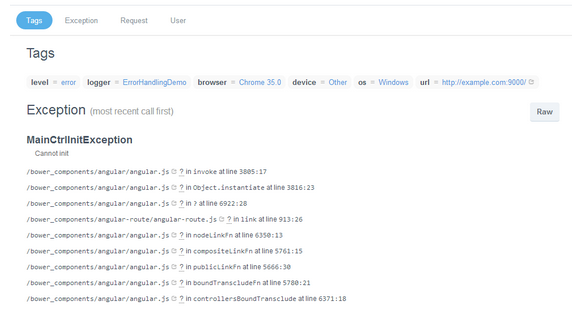
Congratulations! Now you will see your exceptions appear on Sentry:

Image-4


Image-5


References

————-

avatar

Miguel is a professional software developer that has consulted for dozens of companies through his firm – Eridem.se. His focus is on mobile application (android) development, web front-end development (javascript, css, html5) and back-end (mvc, .net, java). He is also continuously learning new software approaches, mostly related with UX, mobile and DevOps, and creating new ventures such as Apprendy.com.

Feel free to leave your comments and questions for Miguel in the comment section below.

Subscribe to the Load Impact blog below. We post something new every week from a different developer or tester.

If you like this blog post and are an experienced front-end developer, we want to hear from you. Check-out our latest job opening: http://www.arcticstartup.com/jobs/1876

5 Ways to Better Leverage a DevOps Mindset in Your Organization

The last few years have given rise to the “DevOps” methodology within many organizations both large and small. While definitions vary somewhat, it boils down to this: breaking down silos between developers and operations.

This seems like a common sense approach to running a business, right?

While many organizations do have a DevOps mindset, I find myself regularly talking to IT staff where there is near zero collaboration between applications teams, network and security. In highly silo-ed organizations these teams can actually work against each other and foster significant animosity. Not my idea of an efficient and agile organization!

Organizations that use a DevOps mindset will deploy applications and capabilities significantly faster and with fewer operational issues from what the industry is reporting.  According to Puppet Labs:

High performing organizations deploy code 30 times more often, and 8000 times faster than their peers, deploying multiple times a day, versus an average of once a month.

It is extremely important that applications teams are creating code and applications in a way that can be properly supported, managed and operationalized by the business. Here are some tips to best leverage this type of approach in any organization:

1. It’s not (entirely) about tools

Everyone loves to buy new technology and tools.  The problem is that often times products are only partially deployed, and capabilities go unused and sit on the shelf. And if you think starting to use some new products and tools will make your organization DevOps enabled, think again.

Building a DevOps culture is much more about taking two parts of the organization whose roots are quite different and bringing them together with a shared vision and goal. Think about it: operations looks at change as the reason the last downtime occurred and App-Dev is constantly trying to evolve and elicit disruptive change. No product or tool is going to make this all happen for you. So start with this in mind.

2. Communication and goals are absolutely critical

This is going to sound really obvious and boring, but if your ops and apps teams are not communicating – not working towards a shared set of goals – everyone is vested if you have a problem.

Defining what the organizational goals are in terms of real concrete objectives that meet the SMART criteria is the right place to start.  I’ll bet most organizations do not have goals that meet this level of specificity so I’ll provide a good and bad example:

  • Bad goal: “We want to be the leader in mobile code management”
  • Good goal: “We will be the leader in mobile code management by June 30th of 2015 as measured by Garnter’s magic quadrant, with revenues exceeding $25m in 2Q 2015″

See the difference?  Even the casual observer (who doesn’t even know what this fictitious space of mobile code management is) could tell if you met the second goal. Great. Now that we have a real concrete goal the organization can put an action plan in place to achieve those goals.

Communication can be a real challenge when teams have different reporting structures and are in different physical locations.  Even if folks are in the same building it’s really important for face to face, human interaction. It’s certainly easier to send an email or text but nothing beats in-person interaction with a regular cadence. Collaboration tools will certainly come into play as well – likely what you already have in place but there are new DevOps communications tools coming to market as well.  But first start with team meetings and breaking down barriers.

3. Practice makes perfect: continuous integration, testing and monitoring

DevOps is about short-circuiting traditional feedback control mechanisms to speed up all aspects of an application roll-out.  This means exactly the opposite of what we typically see in many large software programs and has been particularly acute within large government programs, or at least more visible.

Striving for perfection is certainly a worthy goal, but we should really be striving for better.  This means along the way risks will need to be taken, failures will happen and course corrections put in place.  It is important to realize that this whole DevOps change will be uncomfortable at first, but taking the initial steps and perfecting those steps will help build momentum behind the initiative.

Instead of trying to do every possible piece of DevOps all at once, start with one component such as GIT and learn how to really manage versioning well.Then start working with cookbooks and even use Chef to deploy Jenkins, cool eh?

It’s probably also worth noting that training and even hiring new talent could be a key driving factor in how quickly you implement this methodology.

4. Having the right tools helps

Like I said earlier, everyone loves new tools.. I love new tools!  Since this whole DevOps movement is quite new you should realize that the marketplace is evolving rapidly. What is hot and useful today could not be what you thought you needed tomorrow.

If you already have strong relationships with certain vendors and VAR partners this would be a great time to leverage their expertise in this area (assuming they have it) to look at where gaps exist and where the quick wins are.  If platform automation and consistency of configuration is the right place for the organization to start then going with Chef or Puppet could make sense.

I think the important factors here are:

      • What are your requirements?
      • What do you have budget do acquire and manage?
      • Do you have partners who can help you with requirements and matching up different vendors or service offerings?

Since this could easily turn into a whole series of blog posts on DevOps tools, I’m not going to go through all the different products out there. But if you can quickly answer the questions above, then get moving and don’t allow the DevOps journey to stall at this phase.

If it’s difficult to figure out exactly what requirements are important or you don’t have good partners to work with, then go partner with some of the best out there or copy what they are doing.

5. Security at the pace of DevOps

What about security? Building in security as part of the development process is critical to ensuring fatal flaws do not permeate a development program. Unfortunately, often times this is an afterthought.

Security hasn’t kept pace with software development by any metric so taking a fresh look at techniques and tools has to be done.

Static analysis tools and scanners aren’t terribly effective anymore (if they were to begin with). According to Contrast Security’s CTO and Founder, Jeff Williams, we should be driving towards continuous application security (aka. Rugged DevOps):

“Traditional application security works like waterfall software development – you perform a full security review at each stage before proceeding. That’s just incompatible with modern software development. Continuous application security (also known as Rugged DevOps) is an emerging practice that revolves around using automation and creating tests that verify security in real time as software is built, integrated, and operated. Not only does this eliminate traditional appsec bottlenecks, but it also enables projects to innovate more easily with confidence that they didn’t introduce a devastating vulnerability.”  – Jeff Williams

While DevOps is all about streamlining IT and bringing new applications to market faster, if you don’t ensure that the application can perform under a realistic load in a way real world users interact, there will be problems.

Likewise if an application is rolled out with security flaws that are overlooked or ignored, it could be game over for not only the business but quite possibly the CEO as well. Just look to Target as a very recent example.

It is clear that an integrated approach to developing applications is valuable to organizations, but if you don’t look at the whole picture – operational issues, performance under load and security, you could find out that DevOps was a fast track to disaster. And obviously no one wants that.


—————

Peter CannellThis post was written by Peter Cannell. Peter has been a sales and engineering professional in the IT industry for over 15 years. His experience spans multiple disciplines including Networking, Security, Virtualization and Applications. He enjoys writing about technology and offering a practical perspective to new technologies and how they can be deployed. Follow Peter on his blog or connect with him on Linkedin.

About Load Impact

Load Impact is the leading cloud-based load testing software trusted by over 123,000 website, mobile app and API developers worldwide.

Companies like JWT, NASDAQ, The European Space Agency and ServiceNow have used Load Impact to detect, predict, and analyze performance problems.
 
Load Impact requires no download or installation, is completely free to try, and users can start a test with just one click.
 
Test your website, app or API at loadimpact.com

Enter your email address to follow this blog and receive notifications of new posts by email.