When to Leverage Commercial Load Testing Services, and When to Go it Alone

How and where you execute load and performance testing is a decision that depends on a number of factors in your organization and even within the application development team.

It is not a clear cut decision that can be made based on the type of application or the number of users, but must be made in light of organizational preferences, cadence of development, timeline and of course the nature of the application itself and technical expertise currently on staff.

In this post we will provide some context around some of the key decision points that companies of all size should consider when putting together load NS performance testing plans.

This discussion is really an amalgamation of On-Premise versus SaaS/Open-Source versus Commercial Services.

In the load testing space there are commercial offerings that offer both SaaS and on-premise solutions as well as many SaaS only solutions for generating user load.

From an open source perspective, JMeter is the obvious choice (there are other less popular options such as FunkLoad, Gatling, Grinder, SOAPUI, etc). Having said that, let’s look at the advantages and challenges of the open source solution,  JMeter, and contrast that with a cloud-based commercial offering.

Key JMeter Advantages:

  1. 100% Java application so it can be run on any platform (windows, osx, linux) that can run Java.
  2. Ability to test a variety of types of servers – not just front end HTTP servers.  LDAP, JMS, JDBC, SOAP, FTP are some of the more popular services that JMeter can load test out of the box.
  3. Extensible, plug-in architecture. The open source community is very active in development around JMeter plugins and many additional capabilities exist to extend reporting, graphing, server resource monitoring and other feature sets.  Users can write their own plugins if desired as well.  Depending on how much time and effort is spent there is little that JMeter can’t be made to do.
  4. Other than the time to learn the platform there is no software cost of course since it is open source.  This may be of particular value to development teams with limited budget or who have management teams who prefer to spend on in-house expertise versus commercial tools.
  5. It can be easy to point the testing platform at a development server and not have to engage the network or server team to provide external access for test traffic.  It’s worth noting that while this is easier it is also less realistic in terms of real world results.

Key JMeter Disadvantages:

  1. Being that it is open source you do not have an industry vendor to rely upon for support, development or expertise.  This doesn’t mean that JMeter isn’t developed well or that the community isn’t robust – quite the opposite. Depending on the scope of the project and visibility of the application it can be very helpful to have industry expertise available and obligated to assist.  Putting myself in a project manager’s shoes, would I be comfortable telling upper management, “we thoroughly tested the application with an open source tool with assistance from forums and mailing lists?” if there were to be a major scale issue discovered in production?
  2. It’s very easy to end up with test results that aren’t valid.  The results may be highly reliable – but reliably measuring bottlenecks that have nothing to do with the application infrastructure isn’t terribly useful.  Since JMeter can be run right from a desktop workstation, you can quickly run into network and CPU bottlenecks from the testing platform itself – ultimately giving you unrealistic results.
  3. Large scale tests – not in the wheelhouse of JMeter.  Right in the documentation (section 16.2 of best practices) is a warning about limiting numbers of threads.  If a truly large scale test is required you can build a farm of test servers orchestrated by a central controller, but this is getting pretty complicated, requires dedicated hardware and network resources, and still isn’t a realistic real-world scenario anyway.
  4. The biggest disadvantage is inherent in all on-premise tools in this category in that it is not cloud based.  Unless you are developing an in-house application and all users are on the LAN, it does not makes a ton of sense to rely (entirely) on test results from inside your network.  I’m not suggesting they aren’t useful but if users are geographically distributed then testing in that mode should be considered.
  5. Your time: doing everything yourself is a trap many smart folks fall into, and often times at the expense of project deadlines, focus. Your time is valuable and in most cases it could be better spent somewhere else.

This discussion really boils down to if you like to do things yourself or if the project scope and criticality dictate using commercial tools and expertise.

For the purposes of general testing, getting familiar with how load testing works and rough order of magnitude sizing, you can certainly use open source tools on your own – with the caveats mentioned.  If the application is likely to scale significantly or have users geographically distributed, then I do think using a cloud based service is a much more realistic way to test.

In addition to the decision of open source versus commercial tools is if professional consulting services should be engaged.  Testing should be an integral part of the development process and many teams do not have expertise (or time) to develop a comprehensive test plan, script and configure the test, analyse the data and finally sort out remediation strategies on their own.

This is where engaging experts who are 100% focused on testing can provide real tangible value and ensure that your application scales and performs exactly as planned.

A strategy I have personally seen work quite well with a variety of complex technologies is to engage professional services and training at the onset of a project to develop internal capabilities and expertise, allowing the organization to extract maximum value from the commercial product of choice.

I always recommended to my customers to budget for training and service up front with any product purchase instead of trying to shoe-horn it in later, ensuring new capabilities promised by the commercial product are realized and management is satisfied with the product value and vendor relationship.

——

Peter CannellThis post was written by Peter Cannell. Peter has been a sales and engineering professional in the IT industry for over 15 years. His experience spans multiple disciplines including Networking, Security, Virtualization and Applications. He enjoys writing about technology and offering a practical perspective to new technologies and how they can be deployed. Follow Peter on his blog or connect with him on Linkedin.

Don’t miss Peter’s next post, subscribe to the Load Impact blog by clicking the “follow” button below. 

Performance & Scalability Test: Pantheon -VS- Other Drupal-Based Platforms

In this post I will demonstrate how to  setup a Drupal 7 site from scratch using Pantheon. Then, using Load Impact, I will attempt to compare the performance of Pantheon versus other Drupal-based platforms (Aberdeen Cloud platform and VPS).

Pantheon

For those who don’t know Pantheon, it’s a cloud platform for web development using different frameworks such as Drupal or WordPress. It provides development, testing and live environments for easy deployment using git. And since it’s built using containers instead of virtual machines, it’s performance and scalability is considerably better than traditional hosting providers.

Pantheon-howItWorks copy

Pantheon also provides a platform with preconfigured tools such as Varnish, Redis, Apache Solr, automated backups and application updates, etc.

For this performance test, we are going to need to create a Pantheon user account.

As a registered Pantheon user, we now see the Pantheon control panel:

1-your-sites

Now we need to create a site in order to install Drupal and run a performance test.

Steps to creating a Drupal 7 site using Pantheon

1. After registering an account with Pantheon, click “Create a site now” link.

2-account-ready

2. Next, provide some information about the site, such as the name and the access URL. Later, you can easily redirect your existing domain if you need it.

Press the “Create Site” button to continue with the process.

3-create-site


3. Create or import a site

You can create a site from scratch using one of the available web application cores for Drupal or WordPress, or you can import an existing one – packing your application files and database dump.

For this test, we are going to start a Drupal 7 site from scratch, but feel free to import your existing application if you want to compare its performance in Pantheon.

Select “Start from scratch” option and one of the available cores – in this case Drupal 7.

Press “Install Drupal 7” button to continue with the site installation.

Pantheon will setup the site with the best suitable configuration for Drupal 7.

6-create-drupal-site


4. Use the dashboard and configure your application

Once the site is completely installed you will have access to the site Dashboard where you can configure different aspects of your application, create backups and use the Pantheon tools.

10-dashboard

Now it’s time to install Drupal. As you can see, the site installer only copied Drupal 7 files but it didn’t execute Drupal installation.

You have to do it manually, so just press “Visit Development Site” button.

11-visit-development-site

5. Install Drupal

In this case, you are going to install Drupal 7 using a Pantheon profile – a custom Drupal distribution preconfigured with Pantheon modules and custom configuration that enables Drupal caching and provides better performance, and an Apache Solr integration.

Press “Save and continue” button to go to next installation step where you can select default language for Drupal. You can install Drupal 7 in other languages – but that can be done later.

Press “Save and continue” button again and Drupal will install with pre-selected Pantheon configuration.

After the installation you have to configure site details, such as site name or administrator username, password and email.

Once you’ve completed the form details, Drupal should be installed and ready to use.

12-drupal-choose-profile


6. Start using Drupal

To start using Drupal just press “Visit your new site” link and you will access your brand new Drupal 7 website.

7.  Setup your git repository in your local machine

Now it’s time to set up your git repository in your local machine so you can add or modify your Drupal website.

First of all, you need to add your SSH public key into your Pantheon user account. Just go to “Sites & Account” in your user menu.

18-sites-account

If you don’t already have a SSH key you have to create it. You can find more information about SSH key generation here: http://helpdesk.getpantheon.com/customer/portal/articles/366938-generate-ssh-keys

Once you have created your SSH key, you should add your Public Key just by pressing the “Add key” button. For more information about SSH keys, visit this page: http://helpdesk.getpantheon.com/customer/portal/articles/361246-loading-ssh-keys

Now you can connect to Pantheon git repository using SSH.

8. Configure the repository in your local machine

To configure the repository in your local machine you should have git previously configured. If you need to install git just follow this guide for all platforms https://help.github.com/articles/set-up-git

First you should copy the path to connect to your server using SSH, because you are going to need it later. You can find it in your project dashboard.

20-dashboard

We are going to use Git as connection mode so be sure that it’s selected and copy the URL you find in the textbox. As you can see in the following screenshot:

21-connection-mode

Go to your terminal and execute the following command from the location where you want to create your project repository folder (Don’t forget to use the URL you previously copied):

$ git clone ssh://codeserver.dev.xxx@codeserver.dev.xxx.drush.in:2222/~/repository.git drupal-loadimpact

If everything goes well, the command will create a folder named drupal-loadimpact with all the files corresponding to Drupal 7 core.

9. Install devel module

Now we are going to install devel module. This Drupal module will help us to creat thousands of nodes in our Drupal website.

A node is a Drupal piece of content with multiple fields and properties, and we are going to use them for our performance test.

You can download the module using wget or drush, but remember to place the module files into sites/all/modules directory in your repository folder.

Then add the new files for commit using the following command:

$ git add sites/all/modules/devel

Commit the changes into your local repository using a descriptive message:

$ git commit -m"Added devel module."

And finally push the changes to the remote repository:

$ git push origin master

You can check that everything went well by checking the commit log in your project dashboard.

22-devel-module-commit

You can see the new commit with your descriptive message.

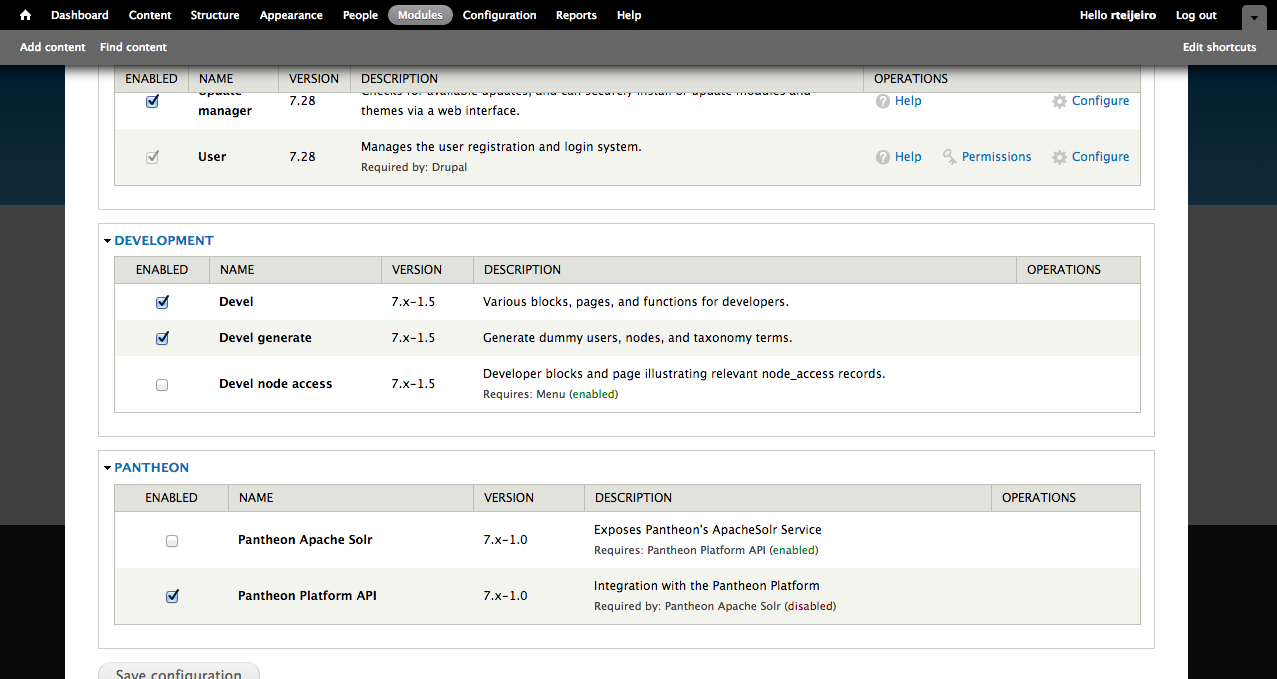
10.  Install devel module by enabling it in Drupal

Select “Modules” menu option from the top menu in your Drupal site.

Enable only Devel and Devel generate modules.

23-drupal-modules


11. Generate content 

Now select “Configuration” menu option from the top menu. And then select “Generate content” option.

25-devel-menu


In this example, we are going to create 5000 nodes of type Article for our performance test. It should be enough to have a high amount of content in the Drupal database and create different performance tests.

27-devel-generate-content

Press “Generate” button and relax because it’s going to take a while. You can take a cup of coffee 😉

…. (coffee break)

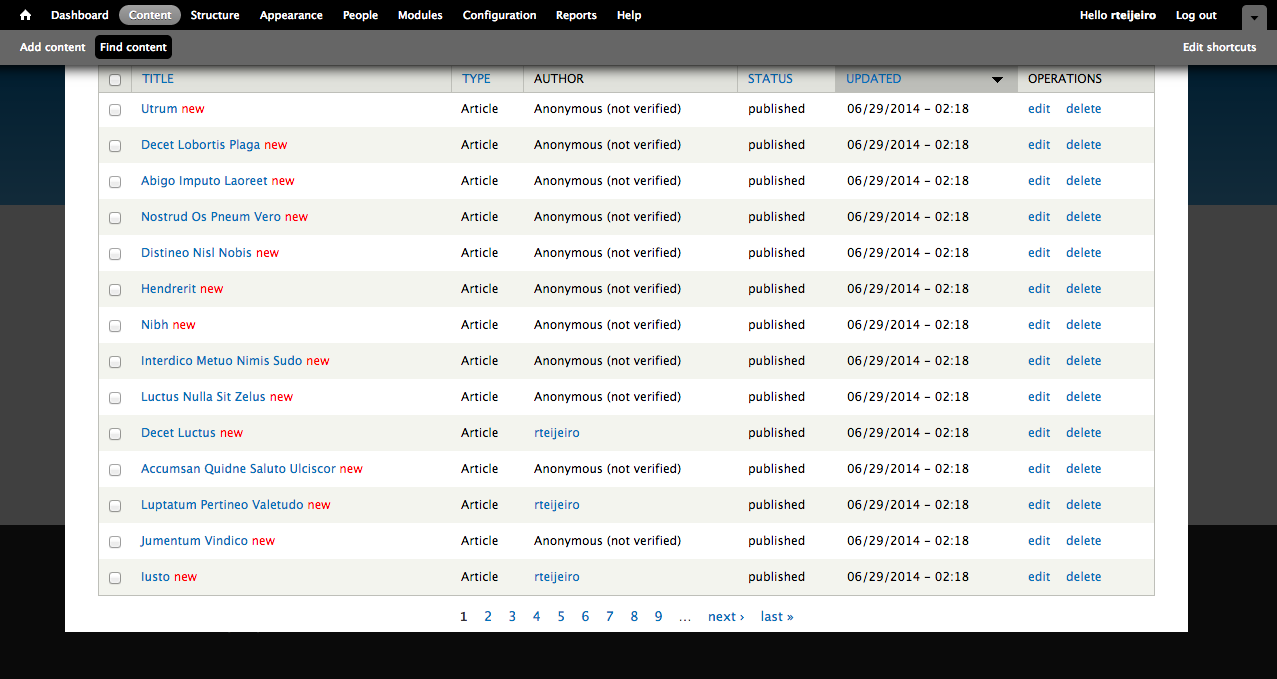
So, here you have your 5000 recently created articles. To see them just select “Content” from the top menu.

29-drupal-content

12. Create page listing all content (for performance testing purposes)

Now we are going to create a page that will list all the content so it will create a high amount of database queries and render a lot information in the page.

For that we will need Views (https://www.drupal.org/project/views) and Chaos Tools Suite (https://www.drupal.org/project/ctools) modules.

You can download them using the same method you used to download Devel module. Don’t forget to place them in sites/all/modules folder to let Drupal to find them and be able to install them.

Once you have downloaded the modules into your local repository, you can add and commit the modules into your local repository as we did before:

$ git add sites/all/modules/views
$ git commit -m”Added views module.”
$ git add sites/all/modules/ctools
$ git commit -m"Added ctools module."

Now push the changes to your remote repository:

$ git push origin master

Once again, you can see your commits in the Commit Log in your project dashboard and verify that everything went well.

To enable the modules, select “Modules” option in your top menu:

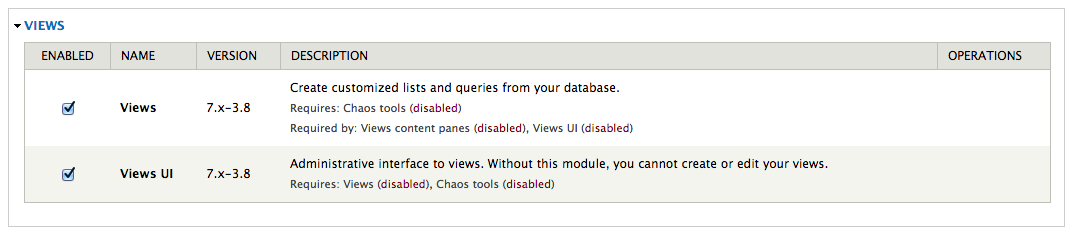
Enable Chaos tools module because it’s a dependency of Views module:

32-chaos-tools

Also enable Views and Views UI modules:

33-views-module-enable

Now select “Structure” option form the top menu to start creating your view page.

Then select “Views” option.

On this page you can find a list of preconfigured views. We are going to create our own view page with a list of a specific number of content articles.

35-views-list


13. Create and configure a new View

Select “Add new view” link to start.

Create a new view using the following configuration and press “Continue & edit” button.

37-views-create

This page is the configuration panel for your view. You can add fields, sorting order and filters as well as arguments and other custom features.

38-views-add-fields

We are going to add a few fields to display more content in the page.

Now you can see that there is only Title field available. Press the “Add” button in “Fields” section.

In the next window select Body and Image fields and press “Apply (all displays)” button with default settings for all fields.

40-views-select-fields

Now your “Fields” section should contain the following:

  • Content: Title
  • Content: Body(body)
  • Content: Image(image)

Press “Save” button to save your new view.

14. Visit your new page

Now you should be able to visit your page. The page we created for testing is here: http://dev-drupal-loadimpact.gotpantheon.com/performance-test

You should see a page with 100 article nodes –  which is a normal amount of data for Drupal to load.

It will create a considerable number of database queries and processes to render all the content into the page.

Consider to increase or decrease the number of items in the “Pager” section of your view if you want to test with different amount of data loaded.

You can select different values to adapt the performance test to your real needs.

43-views-pager-config


We have to take into consideration the default configuration that Pantheon profile applies to Drupal.

If you select “Configuration” in the top menu you can find “Performance” menu item:

44-performance-link

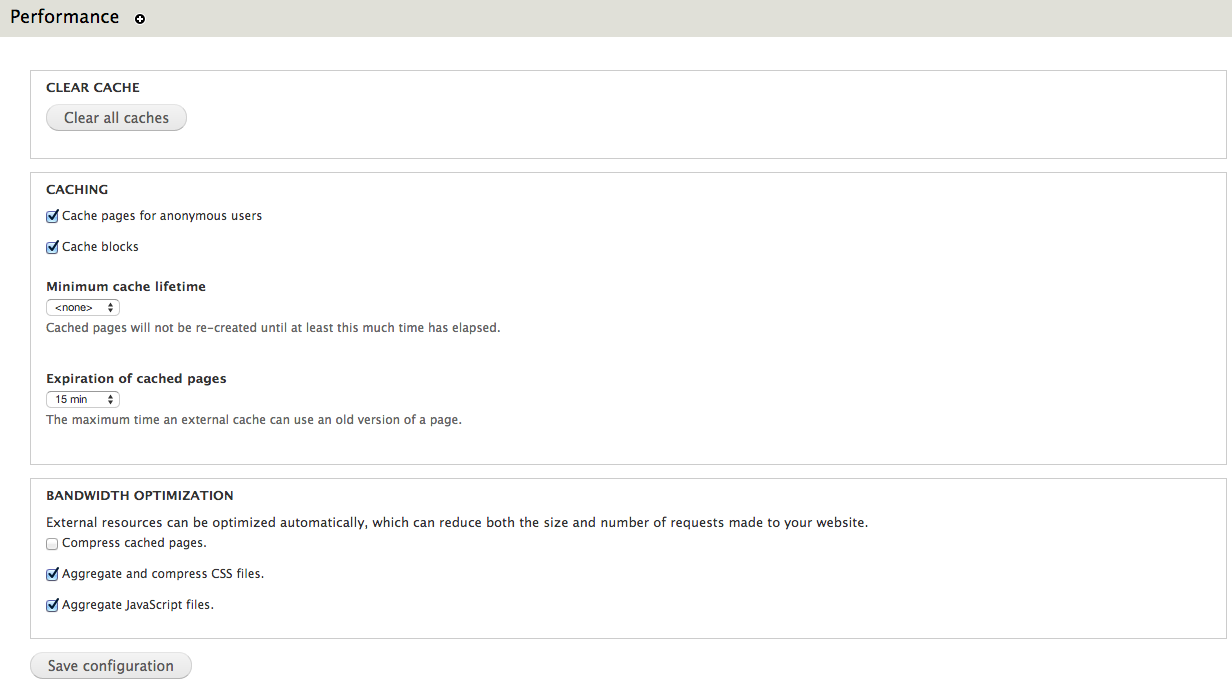
In this page you can find configuration settings related to Drupal performance. You can see that there are a few settings already enabled.

Page and block caches are enabled for 15 minutes. Also, CSS and JavaScript are aggregation is enable – what packs all CSS and JavaScript files and build them together in order to decrease the number of requests to the server to download all the files.

45-performance

It’s important to clear caches every time you run a new performance test to be sure that you don’t have cached pages. Just press “Clear all caches” button.

Testing the performance of Drupal-based platforms

Now it’s time for performance testing using Load Impact. Create a user account if you don’t already have one.

After that visit “My tests” to start creating your performance test and press “Start a new test” button. This will execute a rather small test of 50 concurrent users for 5 minutes.

47-my-tests

Type your test page URL into the text box and press “Start test” button.

You can also configure a larger test from the “Test configurations” page (e.g. with ramp-up/down; additional IPs, multi-geo load generation; mobile network emulation, server metrics, etc.)

48-start-test

The test will start and you will see how Load Impact is creating requests from different hosts.

50-test-running


Pantheon results

The following are the performance test results for the same Drupal site (using the same configuration and number of content nodes) hosted in Pantheon and Aberdeen Cloud platforms and a Virtual Private Server:

51-pantheon-test

Pantheon results (user load time)

Aberdeen Cloud 

52-aberdeencloud-test

Aberdeen Cloud results (user load time)

VPS (CPU: 1.5 Ghz. – RAM: 1 Gb.)

53-VPS-test

VPS results (user load time)


You can observe that Pantheon keeps user load time between 1.5 and 3 seconds, meanwhile with Aberdeen Cloud platform and the VPS, the user load time stays between 3 and 4 seconds.

Based solely on these few simple load tests, it seems Pantheon manages to serve Drupal pages at least one second faster than the other tested platforms. 

Now it’s time for you to try different configurations for the Drupal site, like number of content nodes, disable caching or file aggregation and see how it affects performance and scalability.

Read more about load and performance testing with Pantheon: http://helpdesk.getpantheon.com/customer/portal/articles/690128-load-and-performance-testing

——–

This blog post was written by Ruben Teijero. Follow the Load Impact blog (see below) for more great articles by Ruben and many other fantastic developers, testers and operations pros.

5 Lessons Learned After Self-Hosting Goes Haywire

When things start to go wrong it can sometimes be impossible to contain the unravelling – as if the problematic situation quickly gains momentum and begins to ‘snowball’ into an even worse situation.

This happened to me recently. And since much of what went wrong could have been prevented with good process controls, I believe I have some valuable lessons to share with you.

At the very least this post will be entertaining, as I assume many of you reading this will think to yourself: “yep, been there done that”.

I’ll start by mentioning how I met the folks at Load Impact and started working with their product and writing for them.

I was doing some shopping for a hosting provider for my personal and business website, and ran across someone else’s blog post that tested the performance of all the major players in the ‘affordable web hosting’ segment.  We are talking the $8/month type deals here – the bare bones.

This author used Load Impact to quantify the performance of all these providers and provided great insight into how they faired from a performance and scalability perspective.

My first thought was: awesome! – I’ll use that same tool and test a few out myself, and then compare it to the performance of a self-hosted site.  I already had a bunch of VMs running on an ESXI server so adding a turnkey wordpress site would be super easy.

It turns out that my self hosted site was much faster and scaled all I needed (thanks to Load Impact), so in the end I decided to just self host.

I’m not making any money from the sites – no ecommerce or ads – so it doesn’t really matter from a business perspective.It’s also easier to manage backups and control security when you manage the whole environment.

But it’s also much more likely that the whole thing will get screwed up in a major time-consuming way.

I imagine there are many SMBs out there that self host as well, for a variety of reasons.  It could be that you like having control of your company assets, it was faster and cheaper, or you just like doing everything yourself.

It’s often very difficult for smart people to avoid doing things they can do but probably shouldn’t do as it might not be the best use of their time.

In this blog post I’ll demonstrate how how quickly this situation can go wrong and then go from bad to worse:

Problem #1: my ISP screwed me!

If you are in business long enough, your ISP will screw you too.  I made a change to my service plan (added phone line) which I did the week before we went out of town.

For some reason nothing happened so I decided called my provider while 300 miles away from my house. Of course, this is exactly when things started to unravel.

Instead of provisioning my modem correctly, they removed my internet service and added phone.  No internet.  To make matter worse,  I’m not at home so I can’t troubleshoot.

Lesson #1 – don’t make changes with your ISP unless you can be onsite quickly to troubleshoot.

It was nearly impossible for me to troubleshoot this issue as I couldn’t VPN into my network, there wasn’t a connection at all.

I even had a neighbor come in and manually reboot both my firewall and modem.  That didn’t work, so my only recourse was a dreaded call to customer support.

The first time I called it was a total waste of time, the Customer Support agent had no idea what was going on so that call ended.

Call number two the next day was slightly more productive in that it ended 45 minutes later and a level 2 support ticket was opened.

Finally, upon getting a level 2 engineer on the line (I was home at this point), they immediately recognized that my modem was mis-provisioned and was setup for phone only!  It only took minutes to properly provision the modem and get it back online.

Lesson #2 – if you are technically savvy, then immediately demand a level 2 support engineer. Time spent with first line support is usually a totally frustrating time suck.

giphy

Problem #2: Some things start working again and others mysteriously don’t 

After the final problem-resolving phone call was complete I was tired, hot (AC was off while out of town) and irritated. So when the internet connection finally came back up, I wasn’t exactly in a “I’m making great decisions” mindset.

So I go to check my site and one works fine, but this one it not up at all.  I reboot the VM but still no response from the server.

I’m not sure what is going on.

Lesson #3 – Don’t start making significant changes to things when tired, hot and irritated.  It won’t go well.

This is exactly the point at which I should have made a copy of the VM in it’s current state to make sure I don’t make things worse.  But instead I immediately go to my backup server (Veeam) and try to restore the VM in question.

Well guess what?  That didn’t work either, some sort of problem with the storage repository for Veeam.  Unfortunately, the problem is that some of the backup data is corrupt.

I ended up with a partially restored but completely unusable webserver VM.

giphy-2

Lesson #4 – Test your backups regularly and make sure you have more than one copy of mission critical backups.  

At some point in this whole fiasco, I remembered what this package I had on my desk was.  It was a replacement hard drive for my ZFS array because one of my 4 drives in the RAIDZ1 array was “failing”.

I figured that now would be the perfect time to swap that drive out and allow the array to heal itself.

Under normal circumstances this is a trivial operation, no big deal.  Not this time!

This time, instead of replacing the failing hard drive, I accidentally replace a perfectly good drive!

So now I have a really tenuous situation with a degraded array that includes a failing hard drive and no redundancy whatsoever.

Fortunately there wasn’t any real data loss and eventually I was able to restore the VM from a good backup source.

Finally back online!

Lesson #5 – Be extra diligent when working on your storage systems and refer to Lesson #3.

The overall message here is most, if not all, of these issues could have been easily avoided. But that is the case 99% of the time in IT – people make mistakes, there is a lack of good well documented processes to handle outages, and of course hardware will fail.

It’s also worth noting that in large enterprises mechanisms for change control are usually in place – preventing staff from really messing things up or making changes during business hours.

Unfortunately, many of smaller businesses don’t have those constraints.

So what does this have to do with Load Impact?  Nothing directly…but I think it’s important for people to be aware of the impact that load and performance testing can have on the infrastructure that runs your business and plan accordingly when executing test plans.

Just like you wouldn’t do something stupid like changing network configs, ISP settings or Storage without thoroughly thinking it through, you should also not unleash a world-wide load test with 10,000 concurrent users without thinking about when you should execute the test (hint – schedule it) and what the impact will be on the production systems.

Hopefully there is a test/dev or pre-production environment where testing can take place continuously, but don’t forget many times there are shared resources like firewalls and routers that may still be affected even if the web/app tiers may not be.

And always remember Murphy’s lawAnything that can go wrong will go wrong. 

———-

Peter CannellThis post was written by Peter Cannell. Peter has been a sales and engineering professional in the IT industry for over 15 years. His experience spans multiple disciplines including Networking, Security, Virtualization and Applications. He enjoys writing about technology and offering a practical perspective to new technologies and how they can be deployed. Follow Peter on his blog or connect with him on Linkedin.

Don’t miss Peter’s next post, subscribe to the Load Impact blog by clicking the “follow” button below. 

Load Testing Validates Performance Benefits of CDN – 400% Improvement (CASE STUDY)

Ushahidi used Load Impact to greatly improve the performance of its software. Through comparing “before” and “after” test results it was possible to see the performance impact of optimization efforts – like the use of a CDN. 

Ushahidi is a non-profit tech company that specializes in developing free and open source software for information collection, visualization and interactive mapping. Such software is deployed during disasters so that real time information can be shared across the web. Like WordPress, the software can be self hosted or hosted on the company’s server.

Case:

Ushahidi software is generally used for crisis and disaster situations so optimization is absolutely crucial. An earthquake reporting site based on Ushahidi software (http://www.sinsai.info/) received a spike in traffic after the earthquake and tsunami in Japan and it went down several times, causing service outage at the time the service was needed the most.

Ushahidi were interested in using a load testing tool to test the performance of their software before and after optimization efforts, to determine what effect the optimizatons had had.

Test setup:

There were four load tests run on two different versions of the Ushahidi software. The software was hosted on Ushahidi’s servers. The first two test runs used ramp-up configurations up to 500 concurrent users on the test sites to test performance differences between Ushahidi 2.0.1 and Ushahidi 2.1. The results were revealing, showing performance graphs that were practically identical. There hadn’t been any change in performance from 2.0.1 to 2.1.

From these tests, it was also found out that the theoretical total number of concurrent users for Ushahidi on a typical webserver is about 330 clients but may be lower, depending on configuration. Load times at the 330-client level were very high, however, and defining the largest acceptable page load time to be 10 seconds meant that a more realistic figure would be 100 concurrent users on the typical webserver.

Finally, Ushahidi wanted to measure the potential performance gain when using a CDN (content delivery network). The Ushahidi 2.1 software was modified so that static resources were loaded from Rackspace’s CDN service instead of the Ushahidi server, then the previous load test was executed again.

The result was a major increase in the number of concurrent users the system could handle. Where previous tests had shown a significant slowdown after 60-100 concurrent users, and an absolute max limit of about 330 concurrent users, the CDN-enabled site could handle more than 300 concurrent users before even starting to slow down. To find out the extreme limit of the site with CDN enabled, a final test was run with even higher load levels, and it was found that the server now managed to serve content at load levels up to 1,500 concurrent users, although with the same high load times as in the 330-client case with no CDN.

Service environment:

  • Apache
  • PHP
  • MySQL
  • Linux (CentOS 5.0)

Challenges:

  • Find load limits for 2 different software versions
  • Find load limits with/without CDN enabled for static files
  • Detect potential problems in the infrastructure or web app before they affect customers

Solution:

  • Run ramp-up tests with identical configurations on the 2.01 and the 2.1 software. See which one performs better or worse
  • Run ramp-up tests with identical configurations on the 2.1 software with CDN enabled, and without CDNenabled. See which performs better or worse.
  • Run final, large-volume ramp-up test for the CDN-enabled software, to find out its theoretical maximum concurrent user limit.

Results:

  • Ushahidi found out that there was a significant performance gain when using CDN to serve their static files.
  • Load test measured that performance increased by 300% – 400% when using the CDN
  • Load times started to increase only after 334 concurrent users when using the CDN, and the server timed out at around 1500 concurrent users.
  • Faster time to verify CDN deployment. Test also quantified % increase in performance which leads to justification for additional cost of CDN service.
  • Test showed no changes in load time between version 2.01 and 2.10.

Is Your Application as Mobile and Global as You Claim it is? – Prove it!

Your application has been localized, your website is responsive, you’ve even built a mobile app – how about your performance?! 

It takes more than a mobile app, responsive design and localization to stay ahead of the game, make sure your performance can also meet the demands of an increasingly mobile and global user-base.

Regardless of whether your applications are in a highly virtual, cloud based environment or a self-hosted single datacenter, realistic performance testing must take into account all the complexities that exist between applications and end users. In today’s highly mobile world, users can literally be anywhere in the world coming across connections that vary widely in quality and speed.

A successful application deployment must take into account factors that influence this Quality of Experience (QX) and integrate continuous testing that best simulates a wide variety of situations.

Not long ago, load testing was a simple and typically one-time test done to size hardware before a roll-out. Testing was nearly always done in-house and did not take into effect what the end user experience was like and how those variables could significantly affect not only user experience but server resources as well.

Gone are the days of users only using your application from a desktop, connected to their DSL at home, and located within the same national borders as your business. Depending on who you ask, by 2020 75% of commercial transactions and 50% of consumer spend will be mobile.

Already today, mobile accounts for 25% of all web usage globally – and 80% for China only. With internet penetration soaring in countries like China, Indonesia and Brazil, its no surprise that nearly all big US-based internet properties are seeing a larger portion of their traffic and users coming from abroad.

The 2014 Mary Meeker Internet Trends report revealed that 6 of the top 10 US-based internet properties that have global operations have more than 86% of their users coming from outside the US.

MaryMeeker copy

This shouldn’t come as a major shock to most applications teams, those who now know they must design either a mobile responsive page or a mobile app in addition to the traditional desktop browser to stay competitive, let alone make sure that a users’ experience is consistent regardless of geographic location.

So if applications teams are so focused on designing around an increasing mobile and global user base, wouldn’t it make sense to performance test in that mode as well – using geographically distributed load, simulating mobile networks, browsers and connections?

Here are a few key considerations and benefits of what a global/mobile approach will bring:

 1.  Browser Simulation

Users interact with applications from a wide variety of desktop and mobile browsers (or apps) today and there are very real differences in how each use case impacts scale.  It’s not good enough to simply assume every browser will follow caching and compression directives the same and that TCP connections issues will be consistent across the whole user base.

Additionally you have to take into account iPhone and Android OS types and multiple browsers on each platform.  Bottom line here is to use multiple user scenarios that include different browsers and platforms mixed in!

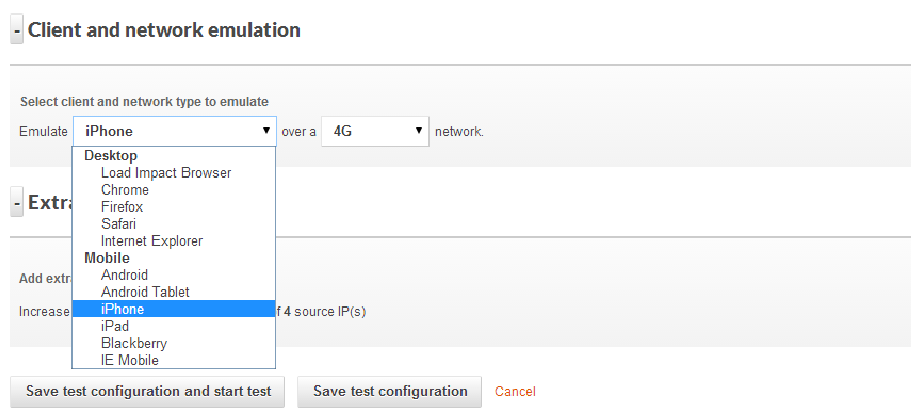
A realistic testing platform should simulate both desktop & mobile browsers

A realistic testing platform should simulate both desktop & mobile browsers

2.  Network Connections

One thing that’s for sure these days is an inconsistency when it comes to how users connect to an application.  Some users will have super low latency, google fiber connections (one can dream) that probably eclipse your datacenter circuit performance and others will be on a roaming 3G connection with tons of packet loss.

Even more challenging is what happens when a mobile user hands off from cellular data to WiFi and what that means to server resources (think  lots of FIN & WAIT TCP states) and experience.  A realistic test should include simulations for multiple connection types – DSL, 3G, LTE, unlimited, etc.  Even better would be a system that can introduce jitter and packet loss to mobile connections for the ultimate in realism and impact to server resources.

Being able to simulate different connection types and associated connection quality is also important

Being able to simulate different connection types and associated connection quality is also important

3.  Geo-Distributed Users

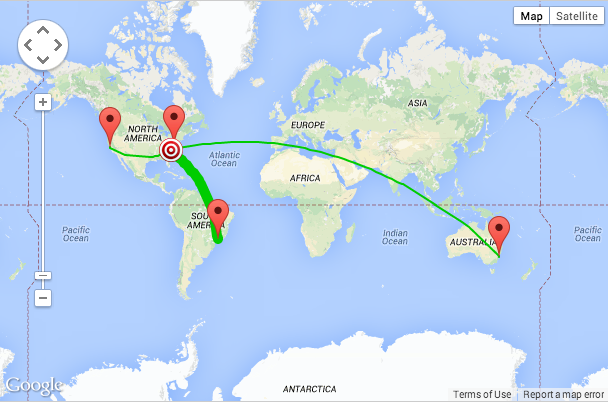
Users are going to be geographically distributed for just about any application these days, even intra-net only corporate applications. And they should expect a great user experience regardless of where they are.  At a bare minimum, testing within the continent where 80% of users will be located is recommended – going global is even better.  Being able to test from multiple geographies simultaneously during a single test is very valuable since you can then see exactly the differences in performance and user experience with the only variable being the user location.

If users are primarily US based then test multiple locations within the US - at least

If users are primarily US based then test multiple locations within the US – at least

However if users (or company execs) frequently travel abroad then test it!

However if users (or company execs) frequently travel abroad then test it!

A great user experience (sub 1-sec load times for example) is great but if that performance drops off a cliff as you move away from the datacenter then looking into a CDN (or a better CDN) may become a high priority.  If you are using distributed server resources and a complex CDN strategy, this is a great way to validate that all is working properly and you are getting the best value from the provider of choice.

The bane of most Ops teams’ existence is the “the app is slow” ticket, and the last thing a user will want to hear from a support reply is “not from here it’s not!”  A great way to identify early potential performance issues on a geographic basis is to continually test (ok maybe hourly or daily) and automate that process.

If a baseline is created then when performance numbers well outside of that reference range occur you can be proactive and not reactive.  If performance is slow from users in the UK but no where else and you have a quantitative analysis in hand, discussions with hosting and CDN providers takes on a much more productive tone.  Think of all the unnecessarily steps and level-1 troubleshooting that can be eliminated, all potentially before the first support ticket is opened for the UK slowness that you already were working on.

Consistently slower page load times from Australia might mean it's time for a new hosting resources or a CDN upgrade

Consistently slower page load times from Australia might mean it’s time for a new hosting resources or a CDN upgrade

With the tools available today, application teams have the ability to continuously test load and performance with highly realistic and sophisticated test scenarios. Performing this testing using a cloud based test platform removes on-premise test tool cost and deployment hassles and allows teams to test at every phase of a deployment including after the app goes live.

This type of approach can also help evaluate different hosting and CDN offerings well before the application goes live, and determine which providers offer the best value in the regions of the country or world you care most about. Taking a pro-active approach to monitoring the performance of applications, especially mobile applications where you are certain to face TCP connection issues, roaming from 4G to WiFI and a host of other mobile-centric challenges will go a long way to ensuring deployment success in a Dev-Ops fashion.


———–

Peter CannellThis post was written by Peter Cannell. Peter has been a sales and engineering professional in the IT industry for over 15 years. His experience spans multiple disciplines including Networking, Security, Virtualization and Applications. He enjoys writing about technology and offering a practical perspective to new technologies and how they can be deployed. Follow Peter on his blog or connect with him on Linkedin.

Don’t miss Peter’s next post, subscribe to the Load Impact blog by clicking the “follow” button below. 

[Case Study] How One Digital Agency Guaranteed Performance BEFORE a Big Release

JWT, one of the largest advertising agencies in the United States and the fourth-largest in the world, used Load Impact to perform load tests to verify that their new campaign site could handle up to 120,000 visitors/hour.

Background:

According to an independent global research study undertaken by Vanson Bourne, even minor delays to website response times can have a sizable impact on customer satisfaction, page views, conversion rates and site abandonment. Despite this, an astonishing 68% of website owners experienced performance or stability problems and 32% of organizations do not know if their website is monitored on a 24×7 basis*. To make matters worse, 47% of PC visitors, 69% of tablet visitors and 34% of smartphone visitors expect response times equal to or below 2 seconds**. 

In an effort to ensure quality performance of a new campaign website built for a client in the pharmaceutical industry, Load Impact was commissioned to establish that the backend for the website could handle the expected traffic – 120,000 visitors per hour – while exhibiting load times that were within acceptable limits.

The campaign-site was built with a user signup/login procedure and offers an interactive online game. The backend for the service is hosted in Texas, and all static content is distributed through a CDN which makes calls to the backend servers. There is also an external partner which handles the user database including registration, signup etc.

Test setup:

For the purpose of testing the backend only, a set of specific user actions were defined, such as “user registration”, “user sign-in”, and other actions where the backend systems had to be involved. These actions were activated through requesting certain URLs, one for each type of action, that were created specifically for the load test. In practice it meant that a simple API was created only for running the load test.

The simulated users in the test were configured to perform a series of these predefined user actions, resulting in corresponding calls to the backend systems. The static content, normally served through CDN operators, was ignored in the test.

The test was run as a series of 5 minute ramp-up tests (simulating approximately 8.33 clients per second), individually tuned depending on results of previous tests and designed to find out the breaking point of the target system.  

Service environment:

  • Apache
  • PHP
  • MySQL
  • Linux

The tested environment consisted of an HTTP load balancer plus web-, application- and database servers.

Challenges:

There were numerous challenges that the test was designed to detect. First of all, there was a need to validate that the system could handle the expected amount of traffic and establish a performance baseline. The test was also set-up to detect potential problems in the infrastructure and web app. 

  • Validate that the system could handle the expected amount of traffic
  • Detect potential problems in the infrastructure or web app
  • Establish a performance baseline

Solution:

The solution agreed upon was to generate and measure load from multiple geographic locations as well as to measure response times, throughput and customer experience.  

  • Load generation and measurements from multiple geographic locations
  • Application response time, throughput and customer experience analysis provided for JWT

Results:

The results of the load test revealed that the campaign website could withstand the expected traffic and there were no specific performance problems with the site. Therefore, a baseline was established at about the required level of 120k visitors/hour.


The external service provider of user registration and sign-in functionality had no problems and their response times remained constant during the tests while the other backend services exhibited response times that were stable until just over the required level of 120,000 visitors/hour, after which response times started to increase rapidly and exponentially.

Specifically, the response times for the start page were under 1 second for up to 2,000 concurrent visitors. Response times for the configured tests, which included the set of specific user actions, were under 2 seconds for up to 2,000 concurrent visitors. Considering that the average response time for similar campaigns of this size is above 4 seconds*, these results were impressive. 

The campaign site was launched successfully on YouTube.

*Source: State of Web Readiness Report, Load Impact, 2013

**Source: How To Deliver Fast, Engaging Responsive Web Design Sites, Akamai, 2012

Saving Your Super Bowl Bacon: How One Advertiser Performance Tested Early and Avoided Disaster

SuperBowl2014__140201231903During Super Bowl  XLVII, Coca Cola, Axe, Sodastream, Calvin Klein had their hands full. Not so much serving online visitors as running around looking for quick fixes for their crashed websites. As reported by Yottaa.com, no fewer than 13 of the companies that ran ads during that Super Bowl saw their websites crash just as they needed them the most.

If anything in this world is ever going to be predictable, a large spike in traffic when you show your ad to a Super Bowl audience must be one of those things.

Thats why one leading digital agency – ROKKAN –  worked with us to guarantee the stability of their client’s campaign website just days ahead of their Super Bowl XLVIII TV commercial.

Getting this level of performance assurance not only eased their client’s concerns, it also showed how committed ROKKAN was to the quality of execution.

As with any advertising campaign, its not only about the glitz and glamour of the ad, its about the ability to motivate action on the part of the audience. And if that motivation is to visit a website, you better be damn well sure that website can take the heat and deliver an exceptional experience. Anything less translates to lost customers, degraded reputation and fewer sign ups – as was this advertiser’s campaign objective.

Background:

The auto industry was the biggest sponsor of the Super Bowl for the third straight year this year. No fewer than seven brands advertised during Fox TV’s telecast of the National Football League’s championship game on Sunday, February 2, 2014.

On average, the carmakers spend as much as $6 million per 30-second spot, for the chance to get in front of an estimated 100+ million viewers. 

“When these types of investments are made, if your website doesn’t work, it becomes very ugly, very quickly for all parties involved in the campaign,” said Jim Blackwelder, chief technical officer for ROKKAN, a Publicis Groupe company that’s done award winning work for American Express, jetBlue, Chipotle, Ceasars Palace, and TAG Heuer. “Everybody just expects technology to work these days, and if it doesn’t, everyone notices.”

Test setup:

The Super Bowl Sunday challenge for ROKKAN – a 2014 Advertising Age A-List Agency for the third consecutive year – could not have been clearer: the target user load for its automaker client’s microsite promoting the features of an upcoming luxury sedan, was over 250,000 visitors per hour coming in from across the country and around the world.  But initial performance tests of the website using Load Impact failed far short of that goal.

“That first test was a total eye-opener,” said Blackwelder.  “Load Impact showed us we had a lot of work to do to get performance where it needed to be.”

At the advice of Load Impact, ROKKAN split performance testing to separately hit the website run by the hosting company Rackspace. The tests were done by going through and around the Rackspace content delivery network (CDN) to uncover crucial performance and configuration issues with both scenarios.

Daily meetings and testing ensued. 

Challenges:

“The team at Load Impact realized that without a full court press – a really integrated effort with all of the stakeholders including ROKKAN, their service providers, as well as Load Impact – the success of the project was far from guaranteed,” said Charles Stewart, Load Impact’s general manager for U.S. operations. 

Solution:

With less than one week from kickoff, ROKKAN made changes and optimizations to problems identified by Load Impact at the caching layer, application layer and hardware layer, that brought page load times to under 4 seconds with just over 10,000 simultaneous users.  

It was 20 times better than when they started, but still a long way from their goal. As an added complication, eleventh hour changes requested by the automaker adversely impacted performance dramatically.

Load Impact and the ROKKAN team examined the data and identified network bandwidth as the likely cause of the performance degradation, and produced reports to support the findings.

With data in hand, Blackwelder was able to go to Rackspace’s network team, which quickly identified and resolved the remaining bottlenecks, increased throughput to the site, and gave ROKKAN’s platform the capacity it needed to scale.  

Results:

The automaker’s website was ready for game day.

“Had we not done performance testing we never would have uncovered a range of issues with both our work and our partners,” said Blackwelder. “Without Load Impact our hitting the project goals and schedule would have been at risk. But it wasn’t at all.  It was a huge success.”

The automaker’s site performed perfectly under the Super Bowl traffic, far exceeding expected connections per second without breaking a sweat, and delivered the customer sign-up conversions that were the automaker’s key success metric.

“For many of ROKKAN’s projects we thought of performance testing as a nice-to-have. But for this project and any of its type, it’s an absolute need-to-have. We needed large scale capacity testing, real-time viewing, and robust reporting, with a platform that could respond to change quickly, and Load Impact delivered on all counts.” – Jim Blackwelder. 

———–

This is a perfect example of how NOT to waste $4 million (not including production costs). If you’ve got a big marketing campaign coming up, make sure your audience can actually fulfill the action you want them to take – performance test your campaign website/app early. 

Scenario Testing: Four Tips on How to Manage Effectively

This article was originally written for Software Testing Professionals.

————

Testing software has always been complex. The minute you add more than a handful of features to any system, theoretical complexity sky rockets.

All the buttons to click, links to follow, client browser versions, client bandwidth and what have you, will soon add up to a near infinite number of things you’d need to test. At the same time, actual users will only engage with a small fraction of those features.

But how does one bring some order to this complexity when, barring a few exceptions, 100% test coverage is basically impossible to achieve?

One approach is to turn to scenario testing. This is where you use a real or hypothetical story that describes how a user actually uses the application. It may sounds very similar to a test case, but a test case is typically single step, whereas scenario tests cover a number of interconnected steps.

A good scenario is one that is based on a credible story of a user performing a complex task. The scenario should be:

  • Critical to all stakeholders (i.e sales, marketing, management, customer support)
  • It should be obvious that the scenario must work as expected
  • The scenario must be easy to evaluate

Scenario testing is primarily thought of as a tool to facilitate feature testing, but performance is sometimes part of that.

Since application performance is very often a non-functional requirement, satisfactory performance is often assumed and lack there of is considered a bug – even if it was never mentioned in the requirements.

Therefore, scenario testing can be used to uncover important performance bottlenecks as well as test features.

Consider this test case for an e-commerce site.

Test case #1: Add valid coupon worth X%
Steps:

  1. Add one or more products to the cart
  2. Go to the checkout page
  3. Add coupon code ‘TEST123’ and click ‘Add coupon’

Expected result:

  • Page refreshes. Message “coupon successfully applied” is visible
  • Discount clearly indicated in the cart summary section
  • Cart total is reduced by X%

Now, imagine that the test case is performed and confirmed to work during development. One of the testers makes a note saying that sometimes, the page refresh takes 4-5 seconds when you have more than 10 products in the cart, but it’s not considered a major issue since it’s affecting a very small number of users.

Now, consider an actual user, Lisa, as she uses the e-commerce site:

Lisa gets a 15% coupon code for an eCommerce site she’s used before and really likes. She decides to order a few things she needs and also asks her mother and sister if they need anything. While she’s shopping, she talks once with her mother and three times with her sister to double check she get’s correct amount, sizes and colors of all items.

After about 20 minutes, Lisa has 20 items worth $900 in her cart. She hits the checkout page where she enters the discount code. The page seems to be doing ‘something’ but after 5 seconds with no visual feedback, Lisa decides that it’s most likely expected behaviour and hits ‘Pay now‘ to proceed. She’s a little worried that she can’t see her discount on the screen, but assumes that it will be presented on the emailed receipt.

Five minutes after completed checkout, she receives the receipt and realizes that she didn’t get the discount. At this point, Lisa feels let down and decides to try to cancel the order. Maybe she will try again later, maybe not.

The story of Lisa’s real world shopping experience makes a great base for a test scenario. A credible story of a user performing a complex task. It highlights to relevant stakeholders – like sales, marketing, management, customer support – that it’s important functionality that really needs to work.

It is, of course, possible to write a few test cases that would capture the same performance issue, but by putting the steps into a realistic and credible context, the coupon code response time suddenly stands out as an important issue.

It suddenly becomes easier to spot and it becomes apparent that, even if it’s a small fraction of all http requests to the server, it will likely seriously affect a customer that wishes to make a rather large transaction. Which, I would like to point out, was the main reason the marketing/sales team wanted to distribute the coupon code in the first place.

Finally, since scenarios are much easier to understand for people outside R&D, it’s easier to involve everyone with an interest in the project. In most organizations, stakeholders such as sales and marketing, customer support and management will find scenarios much easier to grasp than a long (and sometimes boring) list of small test cases.

The challenge is, of course, to find correct and credible stories that both motivate the important stakeholders to participate and at the same time covers as much of the application as possible.

Performance testing can benefit from a scenario approach in many ways. One of the most obvious benefits is that creating scenarios helps to highlight the important application flows that must perform well – just as the coupon code scenario above shows.

Test configurations can then be more focused when we know what the most important areas are. And since scenarios are stories that are easier to understand, it’s also easier for non-technical people to be part of the prioritization work, making sure that first things come first.

Another great benefit that can come specifically from performance testing multiple complex scenarios at the same time is that it can unveil dependencies.

Let’s say that one problem area with an e-commerce web application is slow internal search. While that’s a problem on it’s own, it’s not unlikely that if affects overall database performance. That in turn can affect more important functionality that also uses the database – like registration or checkout.

When applying the concept of scenario testing to your performance testing efforts, here’s a few things keep in mind:

  1. Consider using scenarios in your performance testing. Use tools such as Google Analytics to analyze what paths users take through your site to help you come up with credible and critical scenarios.
  2. Prioritize possible scenarios by thinking how valuable each scenario is. A user browsing your products is good, a user that checks out and pays is better. Make sure you cover the most critical scenarios first by ordering them according to how valuable they are to you.
  3. Consider using Continuous Integration tools such as Jenkins or TeamCity to automate performance scenario testing. An automated test that gives you pass/fail results based on response time is very easy to evaluate.
  4. When the number of scenarios grow, group different ones together based on what part of the system they test. Or group them based on complexity, making sure that all low complexity tests pass before you run the high complexity ones.

———

23582b6This post was written by Robin Gustafsson. Robin is currently CTO at Load Impact. Prior to his role as CTO, he held positions as Solutions Architect, Consultant and lead developer for numerous other tech startups and tech firms, including Ericsson. He also owned and operated his own web development company, Popmint Media, from 2002-2005. Robin specializes is performance testing, software architecture, cloud and distributed computing, as well as Continuous Delivery software development.

[NEW RELEASE] Mobile Performance Testing – Including Network and Client Emulation

Mobile-FeatureToday, we introduced the first true cloud-based load testing Software as a Service for mobile apps, APIs and websites that can simulate traffic generated from a variety of mobile operating systems, popular browsers, and mobile networks – including 3G, GSM and LTE.

Current, only about half of companies with mobile sites or apps today test their mobile code, and a recent industry study reported that when a mobile app fails, 48 percent of users are less likely to use the app again, 34 percent will switch to a competitor, and 31 percent will tell others about their poor experience. [1]

Our new testing service for mobile apps, APIs and websites allows developers to emulate client behavior when downloading content to a phone, specify the number of concurrent downloads in total and per host, as well as the mix of different client applications or browsers, including Safari, Chrome, Firefox and Opera.

Developers can also use our new features to emulate mobile network characteristics including available bandwidth, network delay, packet loss, jitter and packet reordering.

So what’s REALLY changed?

What’s really new is that when we simulate a mobile client – whether it is a mobile user running a mobile web browser and accessing a standard web site, or it is a mobile user playing the Candy Crush app – we can generate the same kind of traffic for the servers to handle that real users would.

If the average mobile user has a network connection speed of, say, 384 kbit/s (old generation 3G) we will not let our simulated client load data faster than that from the servers.

li-test-config-network-emulation

In previous versions of  Load Impact, and in most other load testing tools, every simulated client/user in a load test will load things at maximum possible speed, at all times. This will of course result in a very skewed test result, that might tell you your site/app can handle max 1,000 concurrent users while in reality you could handle a lot more (or less).

Apart from simulating network connection speed, we also simulate network latency, which is equally important for performance as connection speed is  –  just like connection speed, latency also affects how “heavy” a client is for the servers to handle.

Mobile-testing-infographic4

Our network/client emulation feature is currently available at the test level only, but you will soon be able to simulate mobile traffic at the user scenario level too. We’ll be sure to let you know when the update arrives.

Mobile Network Emulation – The Key to Realistic Mobile Performance Testing

Mobile-Testing-Infographic

When was the last time you looked at your website’s browser statistics? If you have, you’ve likely noticed a trend that’s pretty hard to ignore – your users are browsing from a mobile device more than ever before. What was once a small sub-segment of your audience is now growing and representing the majority of your traffic. This may not be so surprising since today mobile usage makes up about 15 percent of all Internet traffic. Basically, if you don’t already have a mobile development strategy, you may already be loosing sales/users due to poor mobile performance. 

Responsive design takes care of your website’s layout and interface, but performance testing for mobile devices makes sure your app can handle hundreds (even thousands) of concurrent users. A small delay in load-time might seem like a minor issue, but slow mobile apps kill sales and user retention. Users expect your apps to perform at the same speed as a desktop app. It seems like a ridiculous expectation, but here are some statistics:

  • If your mobile app fails, 48% of users are less likely to ever use the app again. 34% of users will just switch to a competitor’s app, and 31% of users will tell friends about their poor experience, which eliminates those friends as potential customers. [1]
  • Mobile app development is expected to outpace PC projects by 400% in the next several years. [2]
  • By 2017, over 20,000 petabytes (that’s over 20 million gigabytes!) will be sent using mobile devices. Streaming is the expected primary driver for growth.[3]
  • 60% of mobile failures are due to performance issues and not functional errors. [4]
  • 70% of the performance of a mobile app is dependent on the network. [5]
  • A change in latency from 2ms (broadband) to 400ms (3G network) can cause a page load to go from 1 second to 30 seconds. [6]

These statistics indicate that jumping into the mobile market is not an option but a necessity for any business that plans to thrive in the digital age. You need more than just a fancy site, though. You need a fast fancy site. And the surefire way to guarantee your mobile site/app can scale and deliver a great performance regardless of the level of stress on the system is to load test early and continuously throughout the development process. 

Most developers use some kind of performance testing tools during the development process. However, mobile users are different than broadband users and therefore require a different set of testing tools to make sure they are represented realistically in the test environment. Mobile connections are less reliable; each geographic area has different speeds; latency is higher for mobile clients; and older phones won’t load newer website code. Therefore, you need real-world mobile network emulation and traffic simulation.

Prior to the availability of good cloud performance testing tools, most people thought the solution to performance problems was “more bandwidth” or “more server hardware”. But those days are long over. If you are to stay competitive today, you need to know how to optimize your mobile code. Good performance testing and traffic simulations take more than just bandwidth into account. Network delays, packet loss, jitter, device hardware and browser behavior are also factors that affect your mobile website’s or app’s performance. To properly test your app or site, you need to simulate all of these various situations – simultaneously and from different geographic locations  (i.e. not only is traffic more mobile, its also more global).

You not only want to simulate thousands of calls to your system, you also want to simulate realistic traffic behavior. And, in reality, the same browser, device and location aren’t used when accessing your site or app. That’s why you need to simulate traffic from all over the globe with several different browsers and devices to identify real performance issues. For instance, it’s not unlikely to have a situation where an iPhone 5 on the 4G network will run your software fine, but drop down to 3G and the software fails. Only realistic network emulation covers this type of testing environment.

Finally, simulating real user scenarios is probably the most important testing requirement. Your platform’s user experience affects how many people will continue using your service and how many will pass on their positive experience to others. Real network emulation performs the same clicks and page views as real users. It will help find any hidden bugs that your testing team didn’t find earlier and will help you guarantee that the user experience delivered to the person sitting on a bus using a 3G network is the same as the individual accessing your service seated at their desktop connected through DSL.  

Several years ago, mobile traffic was negligible, but it’s now too prominent to ignore. Simple put, don’t deploy without testing your mobile code!

Check out Load Impact’s new mobile testing functionality. We can simulate traffic generated from a variety of mobile operating systems, popular browsers, and mobile networks – including 3G, GSM and LTE. Test your mobile code now!

About Load Impact

Load Impact is the leading cloud-based load testing software trusted by over 123,000 website, mobile app and API developers worldwide.

Companies like JWT, NASDAQ, The European Space Agency and ServiceNow have used Load Impact to detect, predict, and analyze performance problems.
 
Load Impact requires no download or installation, is completely free to try, and users can start a test with just one click.
 
Test your website, app or API at loadimpact.com

Enter your email address to follow this blog and receive notifications of new posts by email.