Test Driven Development and CI using JavaScript [Part I]

In this tutorial, we will learn how to apply TDD (Test-Driven Development) using JavaScript code. This is the first part of a set of tutorials that includes TDD and CI (Continuous Integration) using JavaScript as the main language.

Some types of testing

There are several approaches for testing code and each come with their own set of challenges. Emily Bache, author of The Coding Dojo Handbook, writes about them in more detail on her blog – “Coding is like cooking

1. Test Last: in this approach, you code a solution and subsequently create the test cases.

  • Problem 1: It’s difficult to create test cases after the code is completed.
  • Problem 2: If test cases find an issue, it’s difficult to refactor the completed code.

2. Test First: you design test cases and then write the code.

  • Problem 1: You need a good design and formulating test cases increases the design stage, which takes too much time.
  • Problem 2: Design issues are caught too late in the coding process, which makes refactoring the code more difficult due to specification changes in the design. This issue also leads to scope creep.

TDD-diagram-1

3. Test-Driven: You write test cases parallel to new coding modules. In other words, you add a task for unit tests as your developers are assigned different coding tasks during the project development stage.

TDD-diagram-2


TDD approach

TDD focuses on writing code at the same time as you write the tests. You write small modules of code, and then write your tests shortly after.

Patterns to apply to the code:

  • Avoid direct calls over the network or to the database. Use interfaces or abstract classes instead.
  • Implement a real class that implements the network or database call and a class which simulates the calls and returns quick values (Fakes and Mocks).
  • Create a constructor that uses Fakes or Mocks as a parameter in its interface or abstract class.

Patterns to apply to unit tests: 

  • Use the setup function to initialize the testing, which initializes common behavior for the rest of the unit test cases.
  • Use the TearDown function to release resources after a unit test case has finalized.
  • Use “assert()” to verify the correct behavior and results of the code during the unit test cases.
  • Avoid dependency between unit test cases.
  • Test small pieces of code.


Behavior-Driven Development

Behavior-Driven Development (BDD) is a specialized version of TDD focused on behavioral specifications. Since TDD does not specify how the test cases should be done and what needs to be tested, BDD was created in response to these issues.

Test cases are written based on user stories or scenarios. Stories are established during the design phase. Business analysts, managers and project/product managers gather the design specifications, and then users explain the logical functionality for each control. Specifications also include a design flow so test cases can validate proper flow.

This is an example of the language used to create a BDD test story:

Story: Returns go to stock

In order to keep track of stock

As a store owner

I want to add items back to stock when they’re returned


Scenario 1Refunded items should be returned to stock

Given a customer previously bought a black sweater from me

And I currently have three black sweaters left in stock

When he returns the sweater for a refund

Then I should have four black sweaters in stock


Scenario 2:  Replaced items should be returned to stock

Given that a customer buys a blue garment

And I have two blue garments in stock

And three black garments in stock.

When he returns the garment for a replacement in black,

Then I should have three blue garments in stock

And two black garments in stock


Frameworks to Install

1. Jamine

Jasmine  is a set of standalone libraries that allow you to test JavaScript based on BDD. These libraries do not require DOM, which make them perfect to test on the client side and the server side. You can download it from http://github.com/pivotal/jasmine

It is divided into suites, specs and expectations

.Suites define the unit’s story. 

.Specs define the scenarios. 

.Expectations define desired behaviors and results. 

Jasmine has a set of helper libraries that lets you organize tests.  

2. RequreJS

RequireJS is a Javascript library that allows you to organize code into modules, which load dynamically on demand.

By dividing code into modules, you can speed up the load-time for application components and have better organization of your code.

You can download RequireJS from http://www.requirejs.org

Part II of this two part tutorial will discuss Behavioral Driven Testing and Software Testing – how to use BDD to test your JavaScipt code. Don’t miss out, subscribe to our blog below. 

————-

avatar

This post was written by Miguel Dominguez. Miguel is currently Senior Software Developer at digitallabs AB but also works as a freelance developer. His focus is on mobile application (android) development, web front-end development (javascript, css, html5) and back-end (mvc, .net, java). Follow Miguel’s blog.

Uncover Hidden Performance Issues Through Continuous Testing

On-premise test tools, APMs, CEMs and server/network based monitoring solutions may not be giving you a holistic picture of your system’s performance; cloud-based continuous testing can.  

When it comes to application performance a wide array of potential causes of performance issues and end user dissatisfaction exist.  It is helpful to view the entire environment, from end user browser or mobile device all the way through to the web and application servers, as the complex system that it is.

system

Everything between the user’s browser or mobile and your code can affect performance

The state of the art in application performance monitoring has evolved to include on-premise test tools, Application Performance Management (APM) solutions, customer experience monitoring (CEM) solutions, server and network based monitoring. All of these technologies seek to determine root causes of performance problems, real or perceived by end users. Each of these technologies has it’s own merits and costs and seek to tackle the problem from different angles. Often a multifaceted approach is required when high value, mission critical applications are being developed and deployed.

On-premise solutions can blast the environment with 10+Gbit/sec of traffic in order to stress routers, switches and servers. These solutions can be quite complex and costly, and are typically used to validate new technology before it can be deployed in the enterprise.

APM solutions can be very effective in determining if network issues are causing performance problems or if the root cause is elsewhere. They will typically take packet data from a switch SPAN port or TAP (test access point), or possibly a tap-aggregation solution. APM solutions are typically “always-on” and can be an early warning system detecting applications problems before the help desk knows about an issue.  These systems can also be very complex and will require training & professional services to get the maximum value.

What all of these solutions lack is a holistic view of the system which has to take into account edge devices (Firewalls, Anti-Malware, IPS, etc), network connectivity and even endpoint challenges such as packet loss and latency of mobile connections. Cloud-based testing platforms such as Load Impact allow both developers and application owners to implement a continuous testing methodology that can shed light on issues that can impact application performance that might be missed by other solutions.

A simply way to accomplish this is to perform a long-term (1 to 24+ hr) application response test to look for anomalies that can crop up at certain times of day.  In this example I compressed the timescale and introduced my own anomalies to illustrate the effects of common infrastructure changes.

The test environment is built on an esxi platform and includes a 10gbit virtual network, 1gbit physical LAN, Untangle NG Firewall and a 50/5 mbit/sec internet link.  For the purposes of this test the production configuration of the Untangle NG Firewall was left intact – including Firewall rules, IPS protections however QoS was disabled.  Turnkey Linux was used for the Ubuntu-based Apache webserver with 8 CPU cores and 2 gigs of ram.

It was surprising to me what did impact response times and what had no effect whatsoever.  Here are a few examples:

First up is the impact of bandwidth consumption on the link serving the webserver farm.  This was accomplished by saturating the download link with traffic, and as expected it had a dramatic impact on application response time:

Impact of download activity on application response times

At approx 14:13 link saturation occurred (50Mbit) and application response times nearly tripled as a result

bandwidth

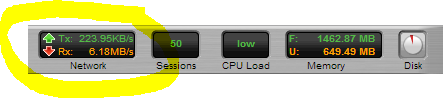
Snapshot of the Untangle Firewall throughput during link saturation testing

Next up is executing a Vmware snapshot of the webserver.  I fully expected this to impact response times significantly, but the impact is brief.  If this was a larger VM then the impact could have been longer in duration:

impact-of-snapshot-on-apache-VM

This almost 4x spike in response time only lasts a few seconds and is the result of a VM snapshot

Lastly was a test to simulate network congestion on the LAN segment where the webserver is running.  

This test was accomplished using Iperf to generate 6+ Gbit/sec of network traffic to the webserver VM.  While I fully expected this to impact server response times, the fact that it did not is a testament to how good the 10gig vmxnet3 network driver is:

iperf

Using Iperf to generate a link-saturating 15+Gbit/sec of traffic to Apache (Ubuntu on VM)


simulate network congestion using iperf 2

In this test approx 5.5Gbit/sec was generated to the webserver,no impact whatsoever in response times

Taking a continuous monitoring approach for application performance has benefits to not only application developers and owners, but those responsible for network, security and server infrastructure.  The ability to pinpoint the moment when performance degrades and correlate that with server resources (using the Load Impact Server Metrics Agent) and other external events is very powerful.  

Often times application owners do not have control or visibility into the entire infrastructure and having concrete “when and where” evidence makes having conversations with other teams in the organization more productive.

———-

Peter CannellThis post was written by Peter Cannell. Peter has been a sales and engineering professional in the IT industry for over 15 years. His experience spans multiple disciplines including Networking, Security, Virtualization and Applications. He enjoys writing about technology and offering a practical perspective to new technologies and how they can be deployed. Follow Peter on his blog or connect with him on Linkedin.

WordPress Vertical Scalability Part I: How Performance Varies with Changes in Hardware

How does your web application respond to improvements in the underlying hardware? Well, that will depend a lot on your application. Different applications are limited by different factors such as RAM, CPU, bandwidth, disk speed to name a few. In this article, I’ll show you an approach to finding out how to test your way to understanding how your application consumes resources.

At some point in the development cycle, preferably early, it makes good sense to narrow down what factors limit your application the most. It’s also useful to flip that statement around and ask yourself: what hardware improvements will benefit your overall performance the most? If you focus on the latter of the two statements, the solution is probably the most important information you need for good resource planning.

To demonstrate the concept of vertical scalability testing, (or hardware sensitivity testing), I’ve set up a very simple WordPress 3.8.1 installation and will examine how performance varies with changes in hardware. The tests are made using virtual machines where hardware changes are easy to make. I’ve created a simple but somewhat credible user scenario using the Load Impact User Scenario Recorder for Chrome.

The simulated users will:

  •  Surf to the test site
  •  Use the search box to search for an article
  •  Surf to the first hit in the search results
  •  Go back to the home page

The baseline configuration is very conservative:

  • CPU: 1 core
  • RAM: 128 Gb
  • Standard disks.

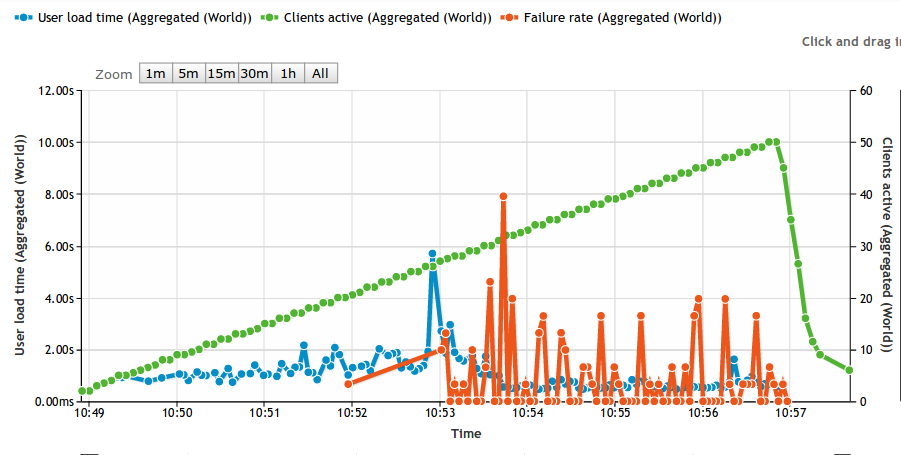
The test itself is a basic ramp up test going from 0 to 50 concurrent users. Based on experience from previous tests with WordPress, a low power server like this should not be able to handle 50 concurrent users running stock WordPress. The idea is to run the test until we start seeing failures. The longer it takes before we see failures, the better. In the graph below, the green line is number of simulated users, the blue line is average response time and the red line is the failure rate measured as number of failed requests/s. As you can see, the first failed requests are reported at 20 concurrent users.

baseline

A comment on the response times (blue line) going down. At a high enough load, nearly 100% of all responses are error messages. Typically, the error happens early in the request and no real work is carried out on the server. So don’t be fooled by falling response times as we add load, it just means that the server is quick to generate an error.


RAM Memory sensitivity

First, I’m interested to see how performance varies with available RAM. I’ve made the point in previous articles that many PHP based web applications are surprisingly hungry for RAM. So let’s see how our baseline changes with increased RAM:

At 256 Mb RAM (2x baseline):

RAM256

At 512  Mb RAM (4x baseline)

RAM512


That’s a quite nice correlation. We see that the number of simulated users that can be handled without a failure is moved higher and higher. At 1024 Mb RAM (8x baseline) we actually don’t get any error at all:

RAM1024

Also note that before the WordPress server spits out errors, there’s a clear indication on the response times. At a light load, any configuration can manage about 1s response time, but as the load increases and we’re nearing the point where we see errors, response times have already gone up.


Sensitivity to CPU cores

Next angle is to look at CPU core sensitivity. With more CPU available, things should move faster, right? RAM memory has been reset to 128 Mb, but now I’m adding CPU cores:

Using 2 CPU cores (2x baseline)

2xCPU

Ops! As you can see, this is fairly close to the baseline. First errors start happening at 20 concurrent users, so more CPU couldn’t do anything to help the situation once we run out of memory. For the sake of completeness, looking at using 4 CPU cores shows a tiny improvement, first errors appear at 23 concurrent users instead of 20.

Using 4 CPU cores (4x baseline)

4xCPU

Adding more CPU cores doesn’t seem to be my highest priority.


Next step, mixing and matching.

You’ve probably already figured out that 128 Mb RAM is too little memory to host a stock WordPress application. We’ve discussed WordPress specifically before and this is not the first time we realize that WordPress is hungry for RAM. But the point of this article wasn’t about that. Rather, I wanted to demonstrate a structured approach to resource planning.

In a more realistic scenario, you’d be looking for a balance between RAM, CPU and other resources. Rather than relying on various ‘rules of thumb’ of varying quality, performing the actual measurements is a practical way forward. Using a modern VPS host that let’s you mix and match resources, it’s quite easy to perform these tests. So the next step is your’s.

My next step will be to throw faster disks (SSD) into the mix. Both Apache/PHP and MySQL benefits greatly from running on SSD disks, so I’m looking forward to seeing those numbers.

Comments, questions or criticism? Let us know by posting a comment below:

——-

0b59bcbThis article was written by Erik Torsner. Erik is based in Stockholm, Sweden, and shares his time between being a technical writer and customer projects manager within system development in his own company. Erik co-founded mobile startup EHAND in the early 2000-nds and later moved on to work as technology advisor and partner at the investment company that seeded Load Impact. Since 2010, Erik manages Torgesta Technology. Read more about Erik on his blog at http://erik.torgesta.com or on Twitter @eriktorsner.


Mobile Network Emulation – The Key to Realistic Mobile Performance Testing

Mobile-Testing-Infographic

When was the last time you looked at your website’s browser statistics? If you have, you’ve likely noticed a trend that’s pretty hard to ignore – your users are browsing from a mobile device more than ever before. What was once a small sub-segment of your audience is now growing and representing the majority of your traffic. This may not be so surprising since today mobile usage makes up about 15 percent of all Internet traffic. Basically, if you don’t already have a mobile development strategy, you may already be loosing sales/users due to poor mobile performance. 

Responsive design takes care of your website’s layout and interface, but performance testing for mobile devices makes sure your app can handle hundreds (even thousands) of concurrent users. A small delay in load-time might seem like a minor issue, but slow mobile apps kill sales and user retention. Users expect your apps to perform at the same speed as a desktop app. It seems like a ridiculous expectation, but here are some statistics:

  • If your mobile app fails, 48% of users are less likely to ever use the app again. 34% of users will just switch to a competitor’s app, and 31% of users will tell friends about their poor experience, which eliminates those friends as potential customers. [1]
  • Mobile app development is expected to outpace PC projects by 400% in the next several years. [2]
  • By 2017, over 20,000 petabytes (that’s over 20 million gigabytes!) will be sent using mobile devices. Streaming is the expected primary driver for growth.[3]
  • 60% of mobile failures are due to performance issues and not functional errors. [4]
  • 70% of the performance of a mobile app is dependent on the network. [5]
  • A change in latency from 2ms (broadband) to 400ms (3G network) can cause a page load to go from 1 second to 30 seconds. [6]

These statistics indicate that jumping into the mobile market is not an option but a necessity for any business that plans to thrive in the digital age. You need more than just a fancy site, though. You need a fast fancy site. And the surefire way to guarantee your mobile site/app can scale and deliver a great performance regardless of the level of stress on the system is to load test early and continuously throughout the development process. 

Most developers use some kind of performance testing tools during the development process. However, mobile users are different than broadband users and therefore require a different set of testing tools to make sure they are represented realistically in the test environment. Mobile connections are less reliable; each geographic area has different speeds; latency is higher for mobile clients; and older phones won’t load newer website code. Therefore, you need real-world mobile network emulation and traffic simulation.

Prior to the availability of good cloud performance testing tools, most people thought the solution to performance problems was “more bandwidth” or “more server hardware”. But those days are long over. If you are to stay competitive today, you need to know how to optimize your mobile code. Good performance testing and traffic simulations take more than just bandwidth into account. Network delays, packet loss, jitter, device hardware and browser behavior are also factors that affect your mobile website’s or app’s performance. To properly test your app or site, you need to simulate all of these various situations – simultaneously and from different geographic locations  (i.e. not only is traffic more mobile, its also more global).

You not only want to simulate thousands of calls to your system, you also want to simulate realistic traffic behavior. And, in reality, the same browser, device and location aren’t used when accessing your site or app. That’s why you need to simulate traffic from all over the globe with several different browsers and devices to identify real performance issues. For instance, it’s not unlikely to have a situation where an iPhone 5 on the 4G network will run your software fine, but drop down to 3G and the software fails. Only realistic network emulation covers this type of testing environment.

Finally, simulating real user scenarios is probably the most important testing requirement. Your platform’s user experience affects how many people will continue using your service and how many will pass on their positive experience to others. Real network emulation performs the same clicks and page views as real users. It will help find any hidden bugs that your testing team didn’t find earlier and will help you guarantee that the user experience delivered to the person sitting on a bus using a 3G network is the same as the individual accessing your service seated at their desktop connected through DSL.  

Several years ago, mobile traffic was negligible, but it’s now too prominent to ignore. Simple put, don’t deploy without testing your mobile code!

Check out Load Impact’s new mobile testing functionality. We can simulate traffic generated from a variety of mobile operating systems, popular browsers, and mobile networks – including 3G, GSM and LTE. Test your mobile code now!

What to Look for in Load Test Reporting: Six Tips for Getting the Data you Need

Looking at graphs and test reports can be a befuddling and daunting task – Where should I begin? What should I be looking out for? How is this data useful or meaningful? Hence, here are some tips to steer you in the right direction when it comes to load testing result management.

For example, the graph (above) shows how the load times (blue) increase [1] as the service reaches its maximum bandwidth (red) limit [2], and subsequently how the load time increases even more as bandwidth drops [3]. The latter phenomenon occurs due to 100% CPU usage on the app servers.

When analyzing a load test report, here are the types of data to look for:

  • What’s the user scenario design like? How much time should be allocated within the user scenario? Are they geographically spread?

  • Test configuration settings: is it ramp-up only or are there different steps in the configuration?

  • While looking at the tests results, do you get an exponential growing (x²) curve? Is it an initial downward trend that plateaus (linear/straight line) before diving downwards drastically?

  • How does the bandwidth/requests-per-second look like?

  • For custom reporting and post-test management, can you export your test results to CSV format for further data extraction and analysis?

Depending on the layout of your user scenarios, how much time should be spent within a particular user scenario for all actions (calculated by total amount of sleep time), and how the users are geographically spread, you will likely end up looking at different metrics. However, below are some general tips to ensure you’re getting and interpreting the data you need.

Tip #1: In cases of very long user scenarios, it would be better to look at a single page or object rather than the “user load time” (i.e. the time it takes to load all pages within a user scenario excluding sleep times).

Tip #2: Even though “User Load Time” is a good indicator for identifying problems, it is better to dig in deeper by looking at individual pages or objects (URL) to get a more precise indication of where things have gone wrong. It may also be helpful to filter by geographic location as load times may vary depending on where the traffic is generated from.

Tip #3: If you have a test-configuration with a constant ramp-up and during that test the load time suddenly shoots through the roof, this is a likely sign that the system got overloaded a bit earlier than the results show. In order to gain a better understanding of how your system behaves under a certain amount of load, apply different steps in the test configuration to allow the system to calm down for approximately 15 minutes. By doing so, you will be able to obtain more and higher quality samples for your statistics.

Tip #4: If you notice load times are increasing and then suddenly starting to drop, then your service might be delivering errors with “200-OK” responses, which would indicate that something may have crashed in your system.

Tip #5: If you get an exponential (x²) curve, you might want to check on the bandwidth or requests-per-second. If it’s decreasing or not increasing as quickly as expected, this would indicate that there are issues on the server side (e.g. front end/app servers are overloaded). Or if it’s increasing to a certain point and then plateaus, you probably ran out of bandwidth.

Tip #6: To easily identify the limiting factor(s) in your system, you can add a Server Metrics Agent which reports performance metrics data from your servers. Furthermore, you could possibly export or download the whole test data with information containing all the requests made during the tests, including the aggregated data, and then import and query via MySQL database, or whichever database you prefer.

In a nutshell, the ability to extrapolate information from load test reports allows you to understand and appreciate what is happening within your system. To reiterate, here are some key factors to bear in mind when analyzing load test results:

  • Check Bandwidth

  • Check load time for a single page rather than user load time

  • Check load times for static objects vs. dynamic objects

  • Check the failure rate

  • For Server Metrics – check CPU and Memory usage status

……………….


1e93082This article was written by Alex Bergvall, Performance Tester and Consultant at Load Impact. Alex is a professional tester with extensive experience in performance testing and load testing. His specialities include automated testing, technical function testing, functional testing, creating test cases, accessibility testing , benchmark testing, manual testing, etc.

Twitter: @AlexBergvall

New Load Script APIs: JSON and XML Parsing, HTML Form Handling, and more!

Load scripts are used to program the behavior of simulated users in a load test. Apart from native functionality of the Lua language, load script programmers can also use Load Impact’s load script APIs to write their advanced load scripts.

Now you can script your user scenarios in the simple but powerful language Lua, using our programmer friendly IDE and new APIs such as: JSON and XML parsing, HTML form handling, Bit-fiddling, and more.

Advanced-Scripting2

Automated Acceptance Testing with Load Impact and TeamCity (New Plugin)

teamcity512

As you know, Continuous Integration (CI) is used by software engineers to merge multiple developers’ work several times a day. And load testing is how companies make sure that code performs well under normal or heavy use.

So, naturally, we thought it wise to develop a plugin for one of the most widely used CI servers out there – TeamCity by JetBrains. TeamCity is used by developers at a diverse set of industry leaders around the world – from Apple, Twitter and Intel, to Boeing, Volkswagen and Bank of America. It’s pretty awesome!

The new plugin gives TeamCity users access to multi-source load testing from up to 12 geographically distributed locations worldwide, advanced scripting, a Chrome Extension  to easily create scenarios simulating multiple typical users, and Load Impact’s Server Metrics Agent (SMA) for correlating the server side impact of testing – like CPU, memory, disk space and network usage.

Using our plugin for TeamCity makes it incredibly easy for companies to add regular, automated load tests to their nightly test suites, and as a result, get continuous feedback on how their evolving code base is performing. Any performance degradation, or improvement is detected immediately when the code that causes it is checked in, which means developers always know if their recent changes were good or bad for performance – they’re guided to writing code that performs well.


Here’s how Load Impact fits in the TeamCity CI workflow:CD-TeamCity


TeamCity-Button


Once you have the plugin installed, follow this guide for installing and configuring the Load Impact plugin for TeamCity. 

New Pay-Per-Test Credits ($1 = 1 Credit)

We recently made two big changes to our pricing.

1. We released monthly subscriptions

2. We converted our test credits to a $1=1 credit model.

If you already had credits in your account before this change, you will notice that the total amount of credits in your account has increased.

Don’t worry, we aren’t a failed state. Your new credit count buys you just as much load testing as you could do before.

We simply wanted to simplify the process of purchasing a single test. Now you can get an exact dollar price for the test you want to run. Easy-peasy-lemon-squeezy!

The price for a single test is based on two factors – load level and test duration.

Head of over to our pricing page to see how it works.

Pay-per-test sliders

Configuring a load test with multiple user scenarios

We recently had a great question come in from one of our customers that we thought we would share.

Question: Planning to run a test with 10.000 concurrent users spanning 4 or 5 user scenarios.  How do I configure a test to run with, say 35% of the load running user scenario 1, 35% running user scenario 2, 10% running user scenario 3 etc?

And, when running multiple scenarios, where each scenario consists of 2 or more pages, how can we see the performance (load time) of each page in each scenario?

Answer: Assigning a certain amount of the simulated users to each user scenario is something you do in the “Test configuration” section.

Just scroll down the page to the section called “User scenarios”, then click the “Add scenario” button to add a new user scenario to the test. When you have all the scenarios you want added, you can fiddle with the percentages to get the exact load allocation for each scenario that you want.

User Scenario Gif Final Medium8(large)


The load time of each page in a user scenario can be collected if you use the –

http.page_start() and http.page_end() functions

– inside the user scenario script. Read more about that here and here.

Example: page metrics

-- Log page metric
 http.page_start("My page")
 responses = http.request_batch({
    { "GET", "http://loadimpact.com/" },
    { "GET", "http://loadimpact.com/style1.css" },
    { "GET", "http://loadimpact.com/image1.jpg" },
    { "GET", "http://loadimpact.com/image2.jpg" }
 })
http.page_end("My page")

Using the above script as a user scenario would result in a plot-able page load time metric for a page called “My page”. The name of the page can be changed to whatever you want.

Make Scalability Painless, by First Identifying your Pain Points

This post was originally written for: 

SDTIMES_Logo

………..

With many, if not most, applications, it is common that a very small part of the code is responsible for nearly all of the application response time. That is, the application will spend almost all of its time executing a very minor part of the code base.

In some cases, this small part of code has been well optimized and the application is as fast as can reasonably be expected. However, this is likely the exception rather than the rule.

It might also be that the real delay happens in external code – in a third-party application depended on.

Regardless of where a performance bottleneck lies, half of the work in fixing it (or working around it) is usually spent identifying where it’s located.

Step 1: Understand how your backend is being utilized.

One of the first things you must do to identify your pain points is to understand how your backend is being utilized.

For example, if your application backend functionality is exposed through a public API that clients use, you will want to know which API functions are being called, and how often and at what frequency they are being called.

You might also want to use parameter data for the API calls that are similar to what the application sees during real usage.

Step 2: Combine performance testing with performance monitoring to locate bottlenecks. 

The second, and more important, step to take is to combine performance testing with performance monitoring in order to nail down where the problems lie.

When it comes to performance testing, it’s usually a matter of experimenting until you find the point at which things either start to fall apart, often indicated by transaction times suddenly increasing rapidly, or just stop working.

When you run a test and reach the point at which the system is clearly under stress, you can then start looking for the bottleneck(s). In many cases, the mere fact that the system is under stress can make it a lot easier to find the bottlenecks.

If you know or suspect your major bottlenecks to be in your own codebase, you can use performance monitoring tools to find out exactly where the code latency is happening.

By combining these two types of tools – performance testing and performance monitoring – you will be able to optimize the right parts of the code and improve actual scalability.

Let’s use an example to make this point clear.

Let’s say you have a website that is accessed by users using regular web browsers. The site infrastructure consists of a database (SQL) server and a web server. When a user accesses your site, the web server fetches data from the database server, then it performs some fairly demanding calculations on the data before sending information back to the user’s browser.

Now, let’s say you’ve forgotten to set-up an important database table index in your database – a pretty common performance problem experienced with SQL databases. In this case, if you only monitor your application components  – the physical servers, the SQL server and the web server – while a single user is accessing your site, you might see that the database takes 50 ms to fetch the data and the calculations performed on the web server take 100 ms. This may lead you to start optimizing your web server code because it looks as if that is the major performance bottleneck.

However, if you submit the system to a performance test which simulates a large number of concurrent users with, let’s say, ten of those users loading your web site at exactly the same time, you might see that the database server now takes 500 ms to respond, while the calculations on the web server take 250 ms.

The problem in this example is that your database server has to perform a lot of disk operations because of the missing table index, and those scale linearly (at best) with increased usage because the system has only one disk.

The calculations, on the other hand, are each run on a single CPU core, which means a single user will always experience a calculation time of X (as fast as a single core can perform the calculation), but multiple concurrent users will be able to use separate CPU cores (often 4 or 8 on a standard server) and experience the same calculation time, X.

Another potential scalability factor could be if calculations are cached, which would increase scalability of the calculations. This would allow average transaction times for the calculations to actually decrease with an increased number of users.

The point of this example is that, until you submit a system to real heavy traffic, you have really no idea how it will perform when lots of people are using the system.

Put bluntly, optimizing the parts of the code you identified as performance bottlenecks when being monitored may end up being a total waste of time. It’s a combination of monitoring and testing that will deliver the information you need to properly scale.

By: Ragnar Lönn, CEO, Load Impact

About Load Impact

Load Impact is the leading cloud-based load testing software trusted by over 123,000 website, mobile app and API developers worldwide.

Companies like JWT, NASDAQ, The European Space Agency and ServiceNow have used Load Impact to detect, predict, and analyze performance problems.
 
Load Impact requires no download or installation, is completely free to try, and users can start a test with just one click.
 
Test your website, app or API at loadimpact.com

Enter your email address to follow this blog and receive notifications of new posts by email.